Checkpointing
Checkpointing is a performance optimization for Inngest functions that executes steps eagerly rather than waiting on internal orchestration. The result is dramatically lower latency — ideal for real-time AI workflows.
In v4 of the TypeScript SDK, checkpointing is enabled by default. You only need to configure it if you want to customize options like maxRuntime or disable it.
Minimum Requirements
Language
- TypeScript: SDK
3.51.0or higher (enabled by default in v4). - Go: SDK version
v0.15.0.
Getting Started
In v4, checkpointing is enabled by default. No configuration is required for long-running or always-on servers.
Max runtime for serverless environments
If your app is deployed to serverless platforms like Vercel, you should configure the maxRuntime option to slightly below your function's maximum duration. See configuration for more information.
const inngest = new Inngest({
  id: 'my-app',
  checkpointing: {
    maxRuntime: '50s', // 50s might be a good option if your max duration is 60s
  }
})
Tip: Many platforms, like Vercel, allow you to configure the maximum duration per function, e.g. on your /api/inngest endpoint. Learn more about configuring on Vercel here.
Disabling checkpointing
To disable checkpointing for all functions, set checkpointing: false on the client:
import { Inngest } from "inngest";

export const inngest = new Inngest({
  id: "my-app",
  checkpointing: false,
});
You can also disable it per-function:
export const myFunction = inngest.createFunction(
  {
    id: "my-function",
    checkpointing: false,
  },
  async ({ step }) => {
    // steps here will use standard orchestration
  }
);
Configuration
Configure how checkpointing behaves with these options:
maxRuntime- default:0(unlimited): The maximum amount of time the function should continuously execute and checkpoint steps before returning the request response. Configure this to be slightly less than the maximum allowed request timeout for your platform or server. For example, if your platform allows900s, you might setmaxRuntimeto800s.bufferedSteps- default:1(no buffering): The number of steps to buffer together before checkpointing. This can help reduce the number of requests made to Inngest when running many steps in sequence. Consider that buffered steps that are not checkpointed may be lost if your server is not gracefully terminated.maxInterval: The maximum interval to wait before checkpointing, even if thebufferedStepscount has not been reached.
checkpointing: {
  maxRuntime: '300s',
  bufferedSteps: 2,
  maxInterval: "10s",
}
How Does It Work?
The Inngest default execution model is a complete handoff to the Inngest Platform, where an HTTP request is performed to store the execution state upon each step completion, leading to inter-step latency.
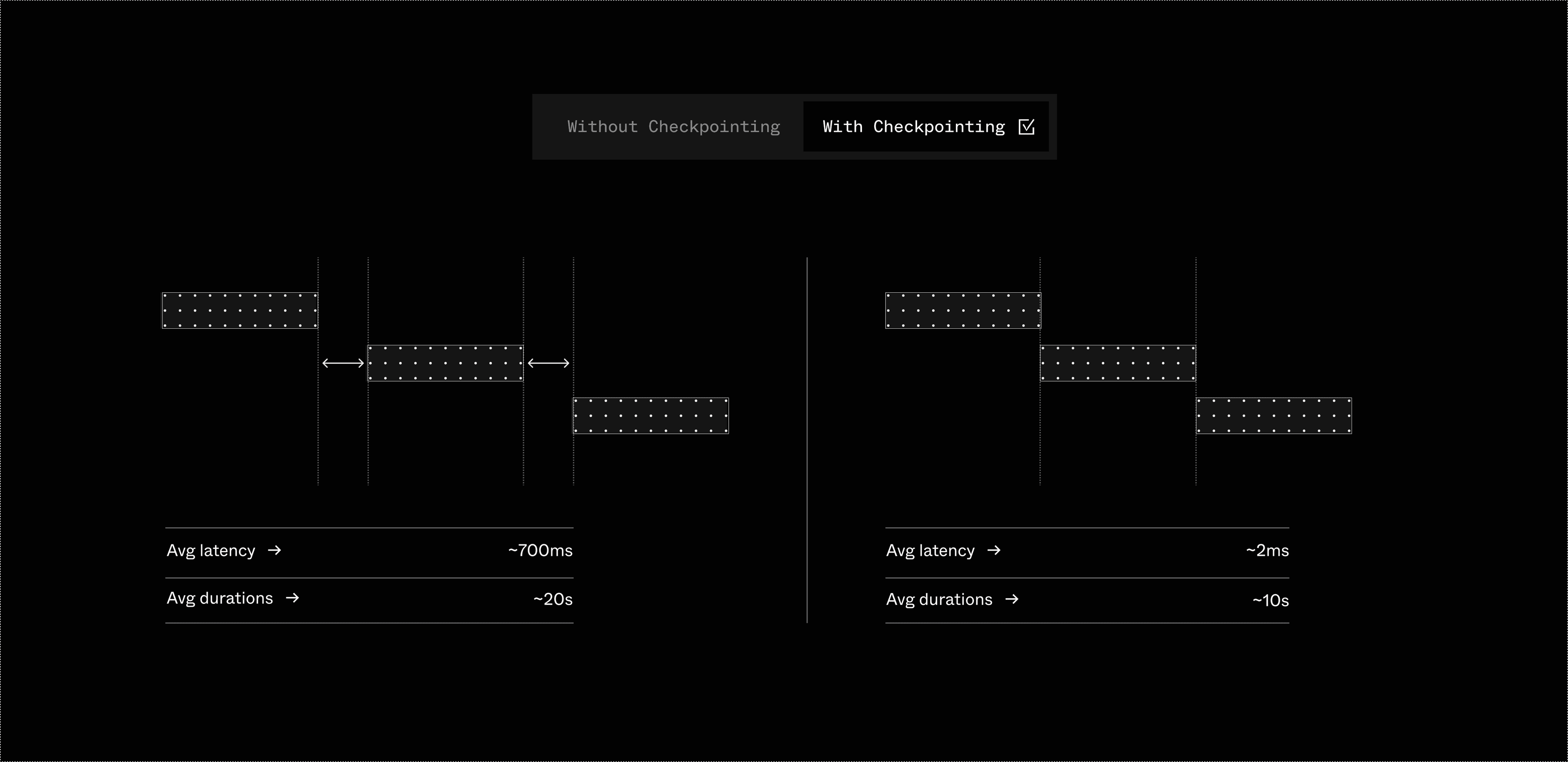
Checkpointing uses the SDK orchestrates steps on the client-side (on your server) and executes them immediately. As steps complete, checkpoint messages are sent to Inngest to track progress. The result is dramatically lower latency — ideal for real-time AI workflows.
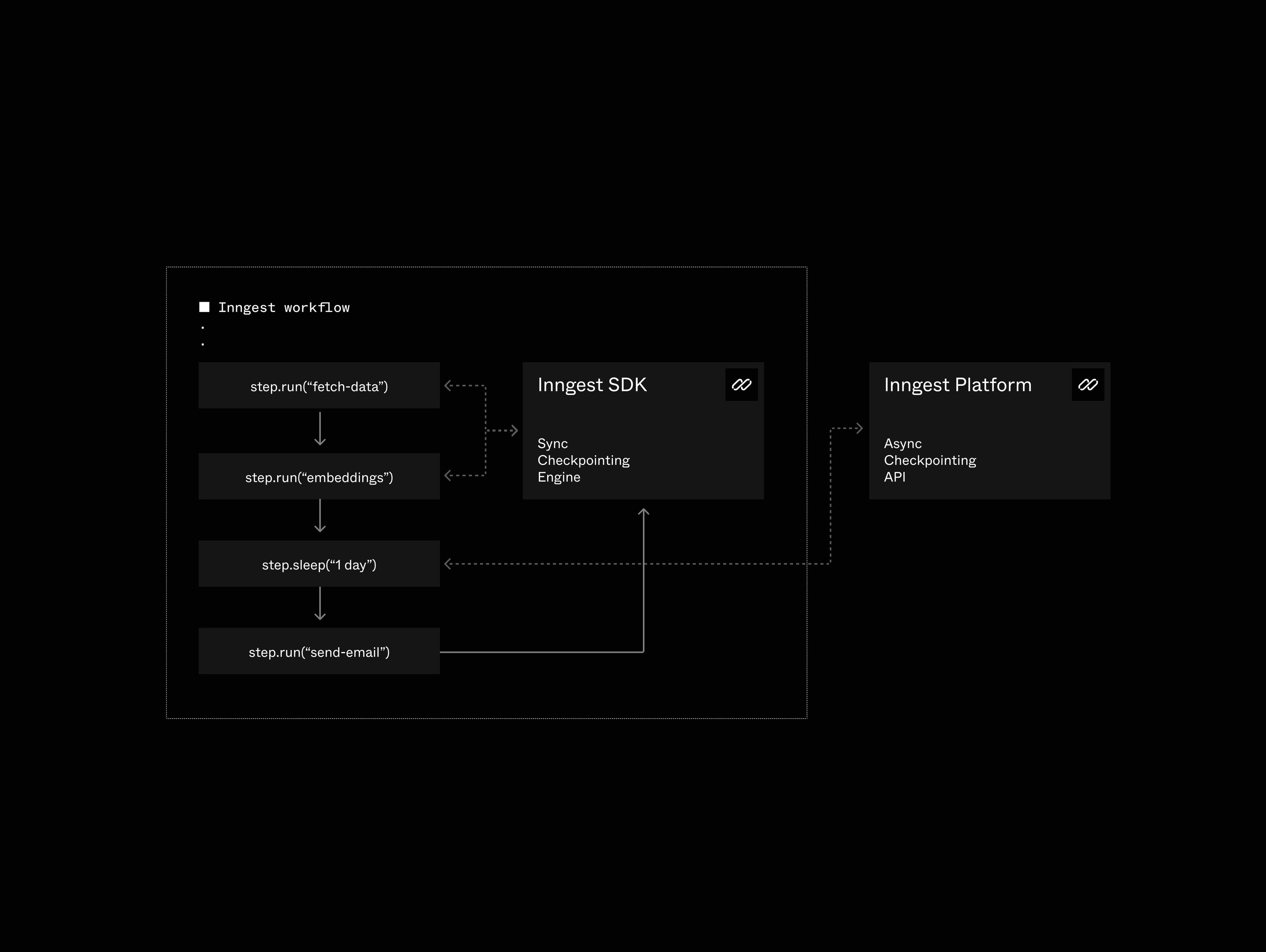
Failures and Retries
What happens when something goes wrong? If a step fails and needs to retry, the execution engine falls back to standard orchestration to handle it properly. You get speed when things work, and safety when they don't.
Notes and limitations
- Parallel step execution — When a function branches into parallel steps, execution switches to standard orchestration. In most cases, when the executor signals that it is finished with parallelization, the SDK is able to switch back into checkpointing mode. The deprecated
optimizeParallelism: falseconfiguration option prevents this, so ifoptimizeParallelismis set to false, checkpointing does not resume after parallel execution.
| Feature | Supported |
|---|---|
| Local development | ✅ |
| Self-hosted Inngest | ✅ |
| Inngest Cloud | ✅ |