Metadata how-to TypeScript only
step.metadata() is a step tool, like step.run(), step.sleep(), or step.waitForEvent(). It attaches custom key-value data to your function runs. Like every step tool, it takes a memoization ID, executes exactly once, and appears as its own step in the trace.
When you're debugging a failed run or trying to understand what happened during execution, the function's input and output only tell part of the story. Metadata lets you attach your own context so it shows up right in the trace view. That might be a payment ID from Stripe, a customer tier, token counts from an LLM call, or a flag marking a run as part of an A/B test.
For the full API surface, see the metadata reference.
Add metadata to a run
step.metadata() works like any other step tool. Pass a memoization ID and call .update() with your key-value pairs. The ID ensures the update runs exactly once, even if the function re-executes during later steps.
const processOrder = inngest.createFunction(
  { id: "process-order", triggers: [{ event: "shop/order.created" }] },
  async ({ event, step }) => {
    const charge = await step.run("process-payment", async () => {
      return await chargeCustomer(event.data.customerId, event.data.amount);
    });

    // Creates its own step in the trace, attaches metadata to the run
    await step.metadata("record-payment-info").update({
      paymentId: charge.id,
      processor: "stripe",
      amount: event.data.amount,
    });

    await step.run("send-confirmation", async () => {
      await sendEmail(event.data.email, charge.receiptUrl);
    });
  },
);
In the trace view, this run would show three steps: "process-payment," "record-payment-info," and "send-confirmation." The metadata from "record-payment-info" is visible on the run.
Add metadata from within an existing step
If you want to attach metadata without creating a separate step, use inngest.metadata inside a step.run() callback. The metadata is batched with the step's output in a single response, making it durable.
const processOrder = inngest.createFunction(
  { id: "process-order", triggers: [{ event: "shop/order.created" }] },
  async ({ event, step }) => {
    const user = await step.run("fetch-user", async () => {
      const user = await fetchUser(event.data.userId);
      // Batched with the step output, no additional step created
      await inngest.metadata.update({ company: user.company });
      return user;
    });
  },
);
Use custom kinds to group metadata
By default, all metadata lands under the "default" kind. Pass a second argument to .update() to organize metadata into named groups:
await step.metadata("payment-meta").update(
  { invoiceId: "inv_123", total: 99.99 },
  "billing",
);

await step.metadata("tracking-meta").update(
  { source: "organic", campaign: "spring-2025" },
  "analytics",
);
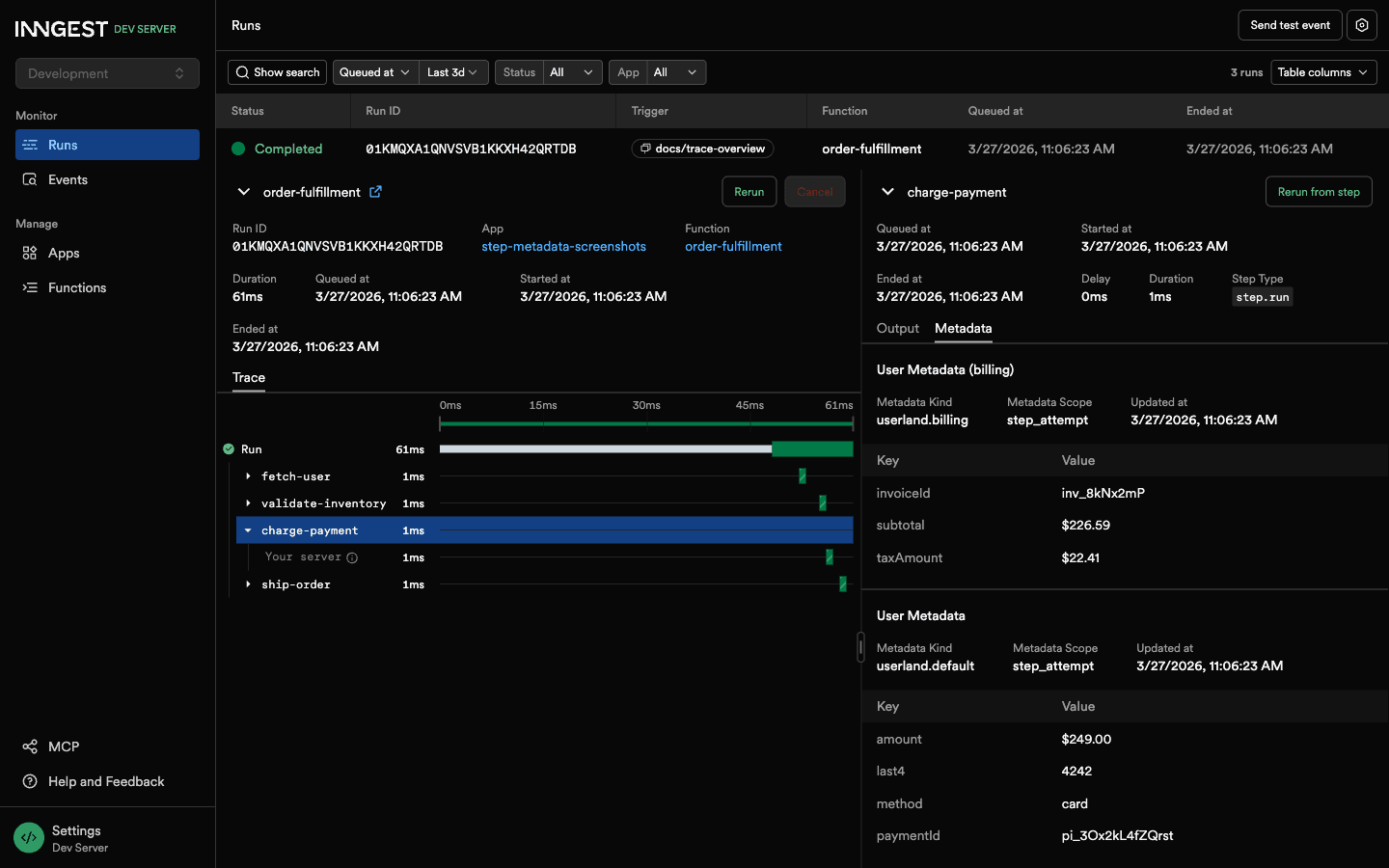
In the dashboard, these show up as separate sections: "User Metadata (billing)" and "User Metadata (analytics)". This keeps things readable when a run has several categories of metadata.
Batch multiple updates in one step
Use .do() to send several metadata updates within a single memoized step. This avoids creating a separate step for each update:
await step.metadata("update-all-statuses").do(async (builder) => {
  await builder.update({ phase: "started", initiator: "system" }, "workflow");
  await builder.update({ estimatedDuration: 30 }, "timing");
  await builder.update({ region: "us-east-1" }, "infra");
});
All three updates share the same memoization step and execute exactly once.
Scope metadata to a specific target
By default, metadata attaches to the run. You can override this with the builder methods to target a specific step or extended trace span:
const myFunction = inngest.createFunction(
  { id: "my-function", triggers: [{ event: "app/task.started" }] },
  async ({ event, step }) => {
    // Explicitly scope to the current run (same as default)
    await step.metadata("run-status").run().update({
      priority: "high",
    });

    // Scope to a specific step by its ID
    await step.metadata("step-annotation").step("process-data").update({
      recordsProcessed: 1500,
    });

    // Scope to an extended trace span
    await step.metadata("span-details").span(spanId).update({
      externalCallDuration: 230,
    });
  },
);
Builder methods are chainable and self-removing. Once you call .run(), you can't also call .step() on the same builder.
Update metadata on a different run
You can attach metadata to a completed or in-progress run from a separate function. This is useful for post-processing, like scoring the output of an AI run:
const evaluateRun = inngest.createFunction(
  { id: "evaluate-run", triggers: [{ event: "ai/run.completed" }] },
  async ({ event, step }) => {
    const score = await step.run("score-output", async () => {
      return await evaluateOutput(event.data.output);
    });

    await step.metadata("record-score")
      .run(event.data.runId)
      .update({
        qualityScore: score.quality,
        relevanceScore: score.relevance,
        evaluatedAt: Date.now(),
      });
  },
);
When targeting a different run, the update is sent via REST API (not batched), since the target run has a different execution context.
Update metadata from outside a function
Use inngest.metadata with an explicit run ID to update metadata from an API route or external service:
await inngest.metadata.run(runId).update({
  approvedBy: "admin@example.com",
  approvalTimestamp: Date.now(),
});
Calling inngest.metadata.update() in the function body but outside of a step.run() is not durable. The function re-executes from the top on each subsequent step, so that update will fire again during every driver call. Use step.metadata() or call inngest.metadata inside a step.run() for durable updates.
View metadata in the dashboard
Metadata appears in the trace detail panel when you select a run or step in the function timeline. Each entry shows the kind label, scope, timestamp, and key-value pairs sorted alphabetically.