Everyone needs retries, but not everyone needs priority queuing. Last week I was looking at product event data to find patterns in our most successful users. What features do they use? Where do less active users stall out? I do this because it helps me prioritize content: tighter docs, more examples, better guidelines.
After looking at 50,000 of our most active users, three tiers of platform maturity emerged: Foundational Reliability, Guardrails, and Optimization. Before you ask… no, “maturity” is not a measure of how much users pay us. Maturity here is a mix of time on platform, number functions, and number of deploys. What I found is a pretty clean delineation of use cases that ranged from table stakes configuration primitives (retries, sleep), to those that only really present at a certain scale (debounce, prioritization).
So, I’m sharing what I found. In this post I cover each stage, top use cases within each, and what it feels like to you—and your users—if you aren’t prepared for the friction each stage introduces.
When do you graduate from queues?
Not building in production? You can probably stop reading for now. Most async backends for internal use cases can usually just start with a queue: Redis + Sidekiq, SQS + Lambda, Celery. Queues decouple "accept work" from "do work." They're just not great at answering everything after that:
What happens if this job fails halfway through a multi-step process? What if the external API I'm calling starts rejecting me? What if the data this job is processing changed while it was running? What if 10,000 events arrive in a burst and each one triggers a separate job?
These questions are answered by durable execution. Where a basic queue gives you "run this function asynchronously," durable execution gives you checkpointed progress that survives failures, automatic retries, the ability to pause long-running workflows, and sometimes—depending on your platform—the ability to control how your functions execute relative to one another: how many run in parallel, how fast they start, who wins, etc.
Inngest is a durable execution engine. So is Temporal, Azure Durable Functions, and AWS Step Functions. The category has gone mainstream, driven largely by AI workloads that are multi-step, non-deterministic, and need to survive LLM outages without re-executing expensive calls. Queues aren’t enough for these types of solutions. If you’re still reading, queues likely aren’t enough for yours.
What we’re measuring (and what we’re not)
As mentioned up top, use of certain features tends to correlate with the maturity of a user’s own application—do they just need basic retries to keep it operational, or are they seeing bursts of usage that require a more complex solution?
Here’s what I see in Inngest’s own user data:
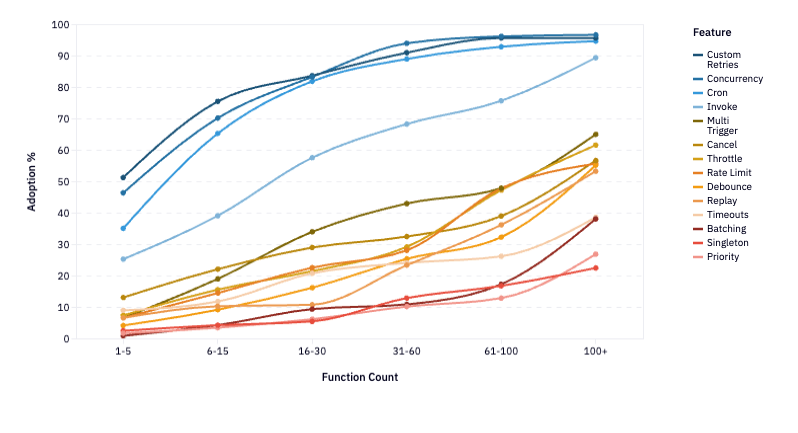
If you squint, you can see 3 groups of features that move together at a similar rate of adoption. (Reminder: I’m skipping over the SDK primitives that exist in nearly 100% of Inngest deployments on Day 1. That’s why the highest starting feature adoption metric you’ll see is 52%—there’s still lots everyone can do on Day 1).
Tier 1 — Foundations (getting your functions right)
The baseline configuration for running async workloads in production. These are the blue lines in the above diagram. Usage scales with the number of functions in production (and number of teammates, number of deploys, time on platform—they all take on the same shape). But usage of these features tend to be much higher right out of the gate.
- Custom Retries — overriding the default retry count or backoff strategy
- Concurrency — limiting parallel instances of a function, often scoped to a user or entity
- Cron — scheduling recurring execution
- Invoke — calling another function and waiting for the result
Tier 2 — Guardrails (protecting your functions at scale)
These are the Flow Control primitives that govern how work moves through your system, plus mechanisms that prevent event storms and stale state from accumulating damage. In terms of adoption, they cluster in the 12-20% range for early users and climb together to 45-55% at scale. This is the tier where teams start solving real production problems: API rate limits, stale data, event storms, bad deploys.
- Multi Trigger — a single function responding to more than one event type
- Cancel — terminating an in-flight run when a newer event makes it obsolete
- Throttle — capping how many new runs start per time window, queuing the rest
- Rate Limit — capping how many new runs start per time window, dropping the rest
- Debounce — coalescing a burst of events into a single run after a quiet period
- Replay — reprocessing historical events through the current version of your code after a bad deploy or bug fix
- Timeouts — setting a hard ceiling on function or step duration
Tier 3 — Optimization (ensuring maximum efficiency at highest complexity)
Patterns that reshape how work enters and exits the system entirely. Adoption hugs the bottom of the graph at under 10% early and only reach 40% among the most mature accounts. These are power-user patterns that produce dramatic efficiency gains, but only at genuine scale.
- Batching — collecting multiple events and processing them together in one run
- Singleton — ensuring only one instance of a function runs globally or per key
- Priority — assigning relative importance so higher-priority runs execute before lower-priority ones
How to solve the challenges you face as you scale
At every maturity level, the three tiers maintain pretty clear separation: they lift together. This is easier to see when laid out by account maturity level. Left to right represents accounts with the lowest number of functions to those with the highest—which is a good proxy for both time on platform and workflow complexity.
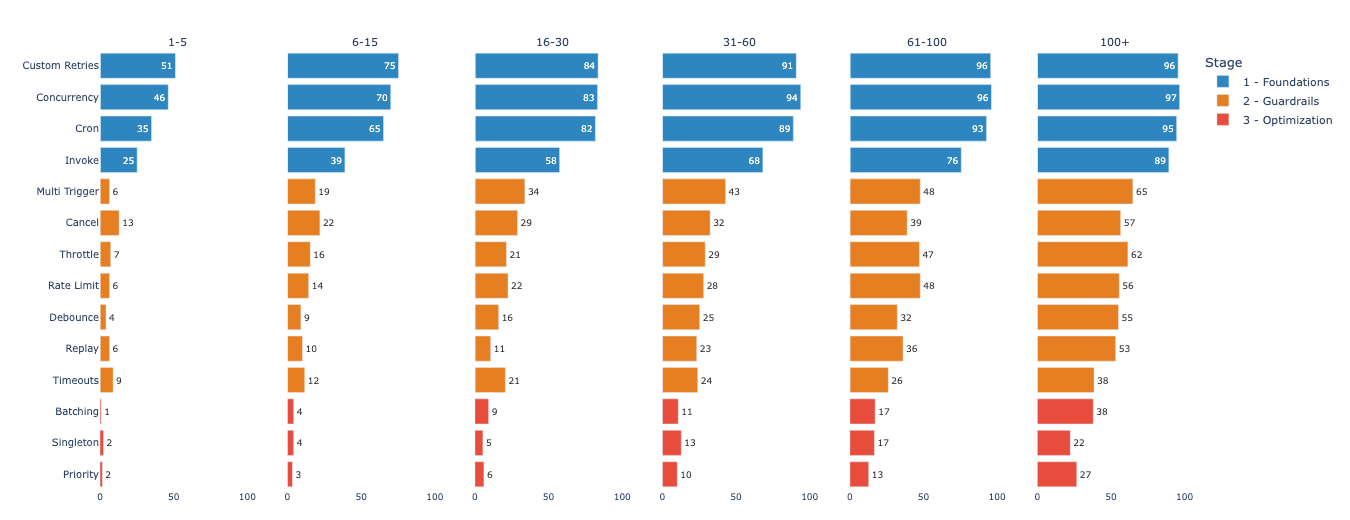
Advanced features almost always co-occur with earlier-tier features, but the reverse almost never happens. That tells us that the answer probably isn’t just about awareness or feature discoverability, but need—as project complexity compounds.
Step 1: Getting started with app durability
If you're reading this post, you’ve likely already faced the need to ensure reliability in your product. When something breaks, code still needs to complete. If you’re already seeing high throughput on your product, you’re also likely to need a bit of concurrency guardrails.
Custom retries: configuring how your functions fail
When you know you need custom retries: A flaky third-party API needs exponential backoff. An LLM call that returned garbage JSON might benefit from an immediate retry. A payment processing failure might need zero retries because double-charging is worse than failing. "Retry everything 3 times" causes more problems than it solves.
If you're building custom retries yourself: Most job frameworks support per-job retry configuration—the key is actually using it rather than accepting the default. Define retry count, backoff strategy, and which error types are retryable for each job class. The gotcha is that most teams set this once globally and never revisit it, which means every job inherits a retry policy designed for none of them.
How Inngest solves custom retries: Per-function retry config (0-20 retries) with customizable backoff. Set it once per function, alongside the rest of the function definition.
Concurrency control: preventing parallel runs from corrupting shared state
When you know you need concurrency control: An event fires and your function starts running, but the same event fires again before the first run finishes, and now two instances are updating the same record, reading stale state, overwriting each other's results. At low volume you never notice, but at medium volume it manifests as data corruption that's painful to reproduce.
If you're building concurrency control yourself: Redis SET NX with TTL gets you a global lock. Keyed concurrency—"only 5 jobs per customer at once"—requires a counting semaphore pattern, typically built on sorted sets or Lua scripts. You also need lock release to handle crashes, not just clean exits. It's a real project that has nothing to do with the business logic you're actually trying to ship.
How Inngest solves concurrency control: Keyed concurrency is a two-line config. The queue management, lock handling, and crash recovery happen underneath.
export default inngest.createFunction({id: "process-order",concurrency: {limit: 10,key: "event.data.merchant_id",},},{ event: "order/placed" },async ({ event, step }) => {// At most 10 concurrent runs per merchant.// The rest queue until a slot opens.});
Scheduled execution (cron): running functions on a recurring interval
When you know you need scheduled execution: ****You need functions to run on a schedule: daily reports, hourly syncs, periodic cleanup. Cron is the oldest pattern in async computing, and it's still essential.
If you're building a cron schedule yourself: Most job frameworks have built-in cron support (Sidekiq Enterprise, Celery Beat, BullMQ repeatable jobs). The real risk is running cron separately from your event-driven job system, which creates two operational surfaces with different retry semantics, different observability, and different failure modes to reason about.
How Inngest solves scheduled execution: Cron is just a trigger type on any function—same retries, same concurrency controls, same observability as everything else, no separate system to operate!
Invoke: composing workflows that depend on each other's results
When you know you need outcome-dependent workflows: You have a workflow that depends on the result of another function—not just firing and forgetting, but actually waiting for the answer before continuing. Without it, you're either polling a database for completion status, building a callback system, or collapsing what should be two distinct functions into one tangled mess to avoid the coordination problem entirely.
If you're building the solution yourself: The naive approach is sending an event and polling for a result record in your database. The cleaner approach is a callback queue—the child job posts its result to a response topic, the parent job is suspended and resumed when it arrives. Either way you're building suspend/resume infrastructure on top of a queue system that doesn't natively support it, and handling timeouts, failures, and partial results in the parent becomes its own project.
How Inngest solves workflow dependencies: Call another Inngest function directly from a step and await its result—the parent run suspends automatically and resumes with the return value when the child completes, with no polling, no callbacks, and no shared state in between.
export default inngest.createFunction({ id: "process-order" },{ event: "order/placed" },async ({ step }) => {const fraud = await step.invoke("check-fraud", {function: checkFraudFunction,data: { orderId: event.data.orderId },});if (fraud.flagged) return { status: "blocked" };// Continue processing with the result in hand.});
Step 2: Start controlling the flow
Flow control features are protective. They solve the problems that emerge once your foundations are solid but you realize your system can make things worse on its own if left unchecked: external APIs pushing back, stale data from race conditions, event storms flooding your system, and bad deploys you need to recover from.
Multi trigger & timeouts: a single function responding to more than one event type
When you know you need multi triggers: Multi trigger lets a single function respond to multiple event types. Without it, you duplicate logic across handlers for what is really one workflow responding to a family of related events (e.g., order/placed, order/updated, order/canceled all feeding the same sync). Timeouts set a hard ceiling on how long a function can run before being automatically canceled. Without them, a hung function waiting on a dead API or stuck in an infinite retry loop consumes resources indefinitely—most painful in long-running workflows and AI agent runs where a single LLM call can stall for minutes.
If you're building this yourself: Both are achievable in any job framework, but both require explicit implementation—and both tend to get skipped until a production incident makes the omission obvious.
How Inngest solves multi-trigger events: Both are function-level config options, set once alongside everything else—no separate timeout middleware, no duplicated handler logic.
Throttle: controlling the pace of outbound work
When you know you need to control the pace of outbound work: Your functions call Stripe, SendGrid, OpenAI, Salesforce, and these APIs all have rate limits. At medium volume, you start catching 429 responses. The reflexive fix is exponential backoff with retries, which sort of works until you realize that retrying a rate-limited request adds load to the very API that's already rejecting you—treating the symptom while amplifying the cause.
If you're building throttling yourself: Most queue systems understand parallelism (how many workers) but not velocity (how many new jobs begin per minute). You need a token bucket or sliding window rate limiter sitting in front of your job queue, keyed per API or per customer, distributed across your worker fleet. Libraries like bottleneck (Node) or ratelimit (Python) help but are typically in-process, which falls apart across a fleet of workers.
How Inngest solves throttling: Declare a limit and a window per function, optionally scoped to a key—Inngest queues the overflow and drains it into the next window automatically.
export default inngest.createFunction({id: "sync-contact-to-crm",throttle: {limit: 30,period: "1m",key: "event.data.account_id",},},{ event: "contact/updated" },async ({ event, step }) => {// At most 30 runs start per minute, per account.// Excess runs queue for the next window.});
Cancel: terminating stale work automatically
When you know you need to cancel work: A user updates their email address. Your sync-to-CRM function is already mid-flight with the old address. It finishes, writes the old address to Salesforce, and the user's change quietly disappears without throwing an error or triggering an alert. This class of bug is maddening because it's intermittent, timing-dependent, and invisible to standard monitoring.
If you're building this yourself: Most queue systems don't support cooperative cancellation natively. The typical workaround is polling a "should I still be running?" flag in the database at each step—which adds latency and complexity to every job, regardless of whether cancellation ever actually fires.
How Inngest solves stale work: Declare which event should cancel an in-flight run and which field to match on—no polling, no flag, nothing to check inside the function body.
export default inngest.createFunction({id: "sync-user-profile",cancelOn: [{event: "user/profile.updated",match: "data.userId",},],},{ event: "user/profile.updated" },async ({ event, step }) => {// If a newer update arrives for the same user,// this run gets canceled automatically.});
Rate limit: dropping work you don't want to queue
When you know you need rate limiting: Throttle queues excess work for later. Sometimes you don't want that. A user clicks "reset password" five times. You want one email, not five queued for eventual delivery. Notifications where duplicates are worse than gaps. Abuse-prone endpoints where you need a hard cap.
If you're building this yourself: The trap is building one generic mechanism and using it for both cases. Throttle is a queue; rate limit is a bouncer. Many teams discover months later that half their jobs needed the other behavior—by which point the side effects are already out in the wild.
How Inngest prevents dropped work: Rate limit is a separate config from throttle, so the intent is explicit and there's no way to accidentally get queue behavior when you wanted drop behavior.
export default inngest.createFunction({id: "send-password-reset",rateLimit: {limit: 1,period: "1h",key: "event.data.email",},},{ event: "auth/password-reset.requested" },async ({ event, step }) => {// First request in the window runs.// The rest are silently dropped.});
Debounce: collapsing event storms
When you know you need debouncing: A customer updates an order in Shopify. Shopify fires webhooks for the order update, the line item changes, the inventory adjustment—your system triggers a workflow for each one. Four webhooks in 500ms, four function runs, all processing the same logical change. Every major webhook provider does this. It's a structural property of webhook architectures, not a bug you can ask them to fix.
If you're building this yourself: Naive deduplication doesn't work here because these are distinct events representing the same logical change. You need a debounce buffer with upsert-on-key, a shared timer that works across workers, and scheduled flush logic. The pieces exist, but assembling them into something reliable takes longer than it looks.
How Inngest solves collapsing event storms: Set a quiet period and a key—Inngest waits, absorbs the burst, and fires once with the latest event data.
export default inngest.createFunction({id: "sync-order-changes",debounce: {period: "5s",key: "event.data.order_id",},},{ event: "shopify/order.updated" },async ({ event, step }) => {// 12 webhooks in 2 seconds become 1 function run.});
For teams processing high-frequency webhooks, debounce can cut invocations by 80-90% overnight. But the adoption data tells you something more important: teams that reach scale all use it. Not because they were clever, but because they hit the wall first.
Replay: recovering from bad deploys
When you know you need replay: You ship a bug. It runs against production events for two hours before you catch it. You fix it, redeploy—and now what? With 5 functions, manually rerunning a handful of jobs is annoying but manageable. With 100, you need to identify which events were affected across dozens of functions, figure out which are safe to reprocess, and do it without triggering duplicate side effects downstream. That's a multi-hour incident without tooling.
If you're building this yourself: You need an event store that retains raw payloads (not just job status), idempotency keys on every downstream side effect, and a reprocessing pipeline that can target specific time ranges and function versions. Most teams that attempt this discover the gaps during their first real incident, not before it.
How Inngest solves bad deploys: Select a time range, pick a function, and reprocess every matching event through the current version of your code—no custom tooling, no manual job reconstruction.
Step 3: Manage highest complexity
These features are adopted by fewer than 3% of early accounts and top out at 38% even among the most mature. They solve problems you only encounter at real scale or with specific architectural patterns, and when they apply, the impact is dramatic.
Batching: amortizing per-event overhead
When you know you need batching: At high volume, per-invocation overhead adds up fast. 10,000 events per hour as 10,000 separate job runs means 10,000x startup cost, connection setup, per-execution billing. One database insert with 100 rows is dramatically cheaper than 100 inserts with one row each.
If you're building this yourself: The cleanest approach is a two-stage pipeline—a lightweight ingester that writes to a buffer, and a scheduled worker that flushes in batches with a max size and max wait time. It works, but it's another system to operate alongside your main job infrastructure.
How Inngest solves amortized overhead: Define a max batch size and a flush timeout—your function receives an array of events and runs once, however many arrived in the window.
export default inngest.createFunction({id: "ingest-analytics-events",batchEvents: {maxSize: 100,timeout: "10s",},},{ event: "analytics/event.tracked" },async ({ events, step }) => {await step.run("bulk-insert", async () => {return await db.analyticsEvents.insertMany(events.map((e) => e.data));});});
Note that batching changes your programming model: your function receives an array and needs to handle partial failures explicitly.
Singleton: ensuring exclusive execution
When you know you need exclusive execution: Some jobs must only have one active instance at a time—database migrations, report generation that writes to a shared resource, sync jobs where overlapping runs corrupt state. This is different from concurrency control, which allows N concurrent runs. Singleton means exactly one.
If you're building this yourself: A distributed lock with the additional requirement that new triggers are either rejected or queued as a replacement. The lock part is well-understood; the "what happens to the next trigger while the lock is held" part is where most implementations get loose.
How Inngest solves ensuring exclusive execution: A key and a mode—skip or replace—and Inngest handles the rest. One decision, made explicitly, per function.
Priority: letting critical work jump the queue
When you know you need priority queuing: Your system runs enough diverse workloads that FIFO produces bad outcomes—payment processing stuck behind report generation, enterprise customers queued behind free-tier users, onboarding workflows sluggish because a marketing campaign backlog is consuming all available workers.
If you're building this yourself: PostgreSQL with ORDER BY priority DESC, created_at ASC or Redis sorted sets are the pragmatic starting points. The harder problem is starvation prevention: low-priority jobs that wait long enough need their priority bumped, or they never run.
How Inngest solves prioritization: Priority is an expression evaluated at runtime, so you can encode real business logic—plan tier, customer value, urgency—without managing separate queues.
export default inngest.createFunction({id: "generate-report",priority: {run: "event.data.plan == 'enterprise' ? 120 : 0",},},{ event: "report/requested" },async ({ event, step }) => {// Enterprise runs execute ahead of free-tier.});
These features save money short-term and enable scale long-term
Most of these patterns reduce your immediate compute usage. Debouncing eliminates redundant runs. Batching collapses invocations. Cancellation terminates stale work early.
These patterns are prerequisites for scaling efficiently, lowering the unit cost enough that new workloads become viable that wouldn't have existed without the efficiency gain.
What to do right now
Ok, so now what? Find your tier based on the challenges you’re facing, and do the next thing up.
If you're still building the foundations: Make sure you have per-function retry configs (not just defaults), keyed concurrency control (not just global limits), and your cron triggers running through the same pipeline as your event-driven work. These should all be in place before you scale further.
If you're ready for more guardrails: The signals—you're catching 429s from external APIs (add throttle). Old jobs are finishing with stale data (add cancel). You're not sure whether to queue excess work or drop it (explicitly choose throttle vs. rate limit per function). Webhook providers are sending bursts for single changes (add debounce). A bad deploy affected production runs and you need a recovery path (add replay). You have functions that should respond to multiple event types (add multi trigger). Long-running workflows occasionally hang (add timeouts).
If you need to further optimize: The signals—per-event cost is too high at your volume (add batching). Certain jobs must never overlap (add singleton). Critical work is stuck behind low-priority jobs (add priority).
The config-level features are all declarative changes in Inngest, or well-understood infrastructure patterns if you're building them yourself. The operational features are harder to retrofit. If you don't have an event store that retains raw payloads or a replay mechanism that respects idempotency, you can't just add one during an incident.
The curve is a map of problems you'll hit as you grow, and the most expensive mistake is discovering you need a guardrail after you needed it. If you're hitting the friction described in any tier above, the Inngest quickstart is the fastest way to see how the pieces fit together in a real app. If you're already in production and want to work through what adoption looks like for your specific stack, reach out—we do this regularly with teams at every stage.
This is the first post in a series on scaling async workflows. Each follow-up goes deep on a specific feature with detailed use cases and implementation patterns.