

Webhooks: see why requests fail, and fix them from the API, CLI, and MCP
November 23, 2026
Every webhook page in the dashboard now has a Recent activity section. It shows how many events the webhook ingested over the last 7 days, and which requests failed and why.
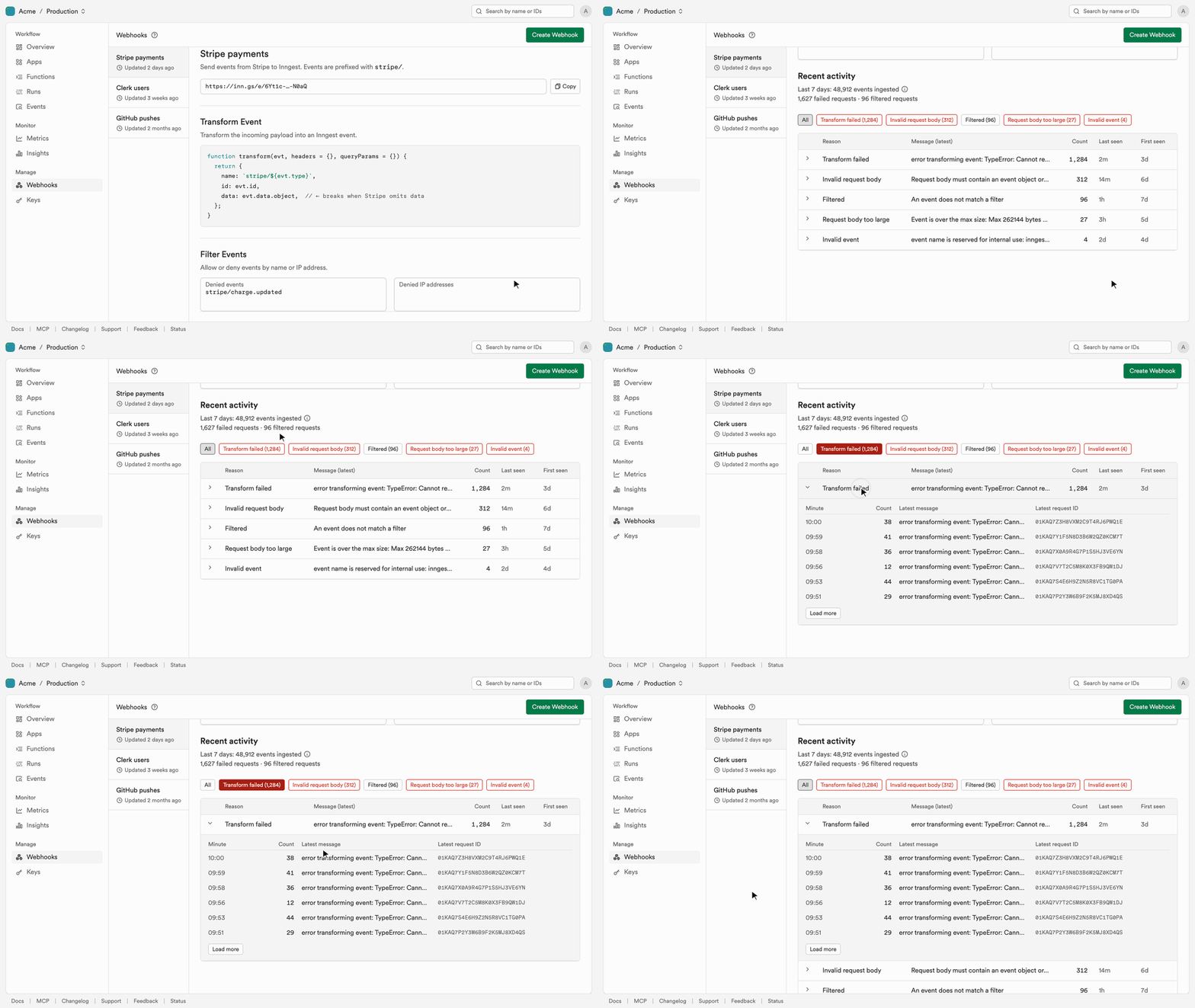
- Totals — Events ingested, failed requests, and filtered requests over the last 7 days. Filtered requests are counted apart from failures.
- Failures by reason — Failed requests are grouped by reason, such as a failed transform, an invalid request body, a body that is too large, or an invalid event name. Click a reason to show only those requests.
- Per-minute detail — Expand a reason to see each minute it happened, with the request count, the latest error message, and the latest request ID.
A request that sends a batch of events and only partly ingests counts toward both totals: its ingested events count as events, and the request counts as a failure.
Update webhooks from the API, CLI, and MCP
Once you've found the problem, you can fix it without the dashboard. Webhooks can now be updated, as well as created and listed, through the REST API, the CLI, and MCP. An update changes a webhook's name, its transform, or both; fields you leave out stay the same.
- API —
POST /v2/webhooks/{id}withnameand/ortransformin the JSON body and theX-Inngest-Envheader set to the environment. - CLI —
inngest api --prod --env production update-webhook <id> --transform '<js>'. Use--nameto rename it. - MCP — The
update_webhooktool, so your coding agent can patch a broken transform.
Updating requires the webhooks:write:update permission, which webhooks:write:* also covers. Create and list webhooks at POST /v2/webhooks and GET /v2/webhooks; the older /v2/env/webhooks routes still work but are deprecated. Webhook management is only available in Inngest Cloud, not the Dev Server.
See the API reference, the CLI docs, and the MCP docs.
Open any webhook under Manage → Webhooks to see it, or read the webhooks docs to set one up.