Inngest CI overview
Write your CI in TypeScript, run it on Inngest, and debug every run as one trace.
Inngest CI is an Inngest Labs project: early, moving fast, and shaped by your feedback. What's Labs?
Inngest CI is CI written in TypeScript, in your repo next to your app. Pipelines start on any Inngest event, from a GitHub push to a cron or your own app, and each job runs on its own Sandbox.
- TypeScript all the way down. Use
if, loops, andPromise.all, and import your app's own code. Pipelines → - One trace per run. Every job, command, and retry in one place. See a run →
- Retries that keep passed work. Only the failed command runs again. Retries →
- Build once, reuse it. Start jobs from another job's machine, and cache the slow ones. Machines →
- Runs locally. Test CI against your uncommitted changes. Quick start →
- Flow control. Cancel stale runs, cap concurrency, and debounce. Flow control →
- GitHub checks. One per pipeline, and one per job. Checks →
How a run works
This pipeline runs on every pull request. base installs dependencies once. lint and test each start from a copy of the base machine and run in parallel.
ci/pipelines.tsimport { github, checkout, from, $ } from "@inngest/ci";import { ci } from "./client";export const pr = ci.pipeline( { id: "pr", on: github.pullRequest(), singleton: { key: "event.data.pull_request.number", mode: "cancel" }, }, async () => { await Promise.all([ lint(), test(), ]); },);const base = ci.job("base", async () => { await checkout(); await $`pnpm install`;});const lint = ci.job("lint", async () => { await from(base); await $`pnpm lint`;});const test = ci.job("test", async () => { await from(base); await $`pnpm test`.retries(1);});Code notes
- Run it on your machine:
The same pipeline runs against the Inngest Dev Server with your uncommitted changes, so you can check CI before you push.
- A pipeline is a function:
A pipeline is TypeScript that lives in your repository, next to your business logic. It imports the same helpers and SDKs your app already uses.
- Typed triggers:
Choose the trigger in code and
eventis typed from it: the pull request number, branch and head commit, with autocomplete. - Flow control built in:
One line replaces concurrency groups and cancel-in-progress settings: a new push cancels the run still going for that pull request. Concurrency, throttling and debounce work the same way.
- Orchestrate with native JavaScript:
No dependency graph to declare:
Promise.allruns jobs in parallel,awaitruns them in order, and anifskips what a change does not need. - Build once, share it:
No cache keys to tune.
basechecks out and installs once, and every job that starts from it gets a copy of that machine. - Start where
basefinished:Waits for the one
basebuild, then starts this job on a copy of its machine, already checked out and installed. lint:Runs on its own copy of
base, with no repeated checkout or install.- Retries that keep passed work:
If
pnpm testfails it runs again on the same machine. Nothing that already passed runs again, so you never rerun all of CI. - One trace for the whole run:
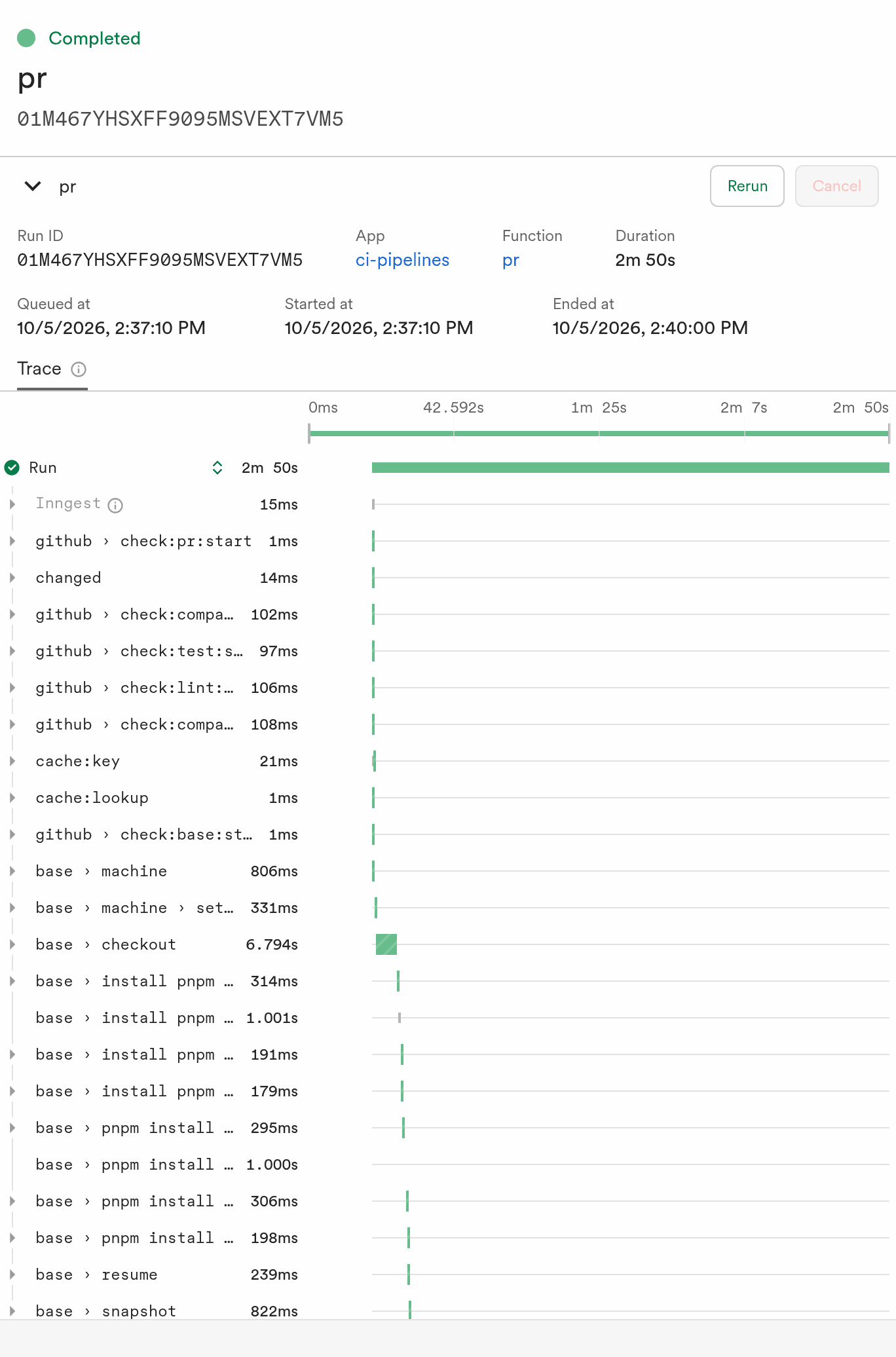
When both jobs pass the run completes, and its trace shows every job, command and retry in one place.
base runs once, however many jobs start from it. If pnpm test exits with a non-zero code, .retries(1) runs it again on the same machine, and each attempt is its own step in the trace. If it still fails, the test check fails and the run ends. Inngest does not retry a run because a command failed.
If a step fails for another reason, such as a GitHub API 503, Inngest retries that step and replays the saved results. base, lint, and every finished command do not run again.
Concepts
A pipeline runs when a trigger fires and calls jobs. Each job runs commands on its own machine and reports a check. Concepts defines each part with a short example.
See the result
Every run opens in the Inngest dashboard as one trace. Its steps start with their job, as in base › checkout, and cover each command, the Sandbox steps behind them, and GitHub checks. Step names lists them.
On GitHub, the same run appears as one check for the pipeline and one for each job:
✕ pr             test: `pnpm test` exited with 1
✓ pr / base      Passed in 41s
✓ pr / lint      Passed in 22s
✕ pr / test      `pnpm test` exited with 1
In dev mode, the same transitions print to your terminal. See Checks and reports.
Next steps
- Quick start runs this pipeline on the Dev Server.
- Concepts defines pipelines, triggers, jobs, commands, and machines.
- Reference lists every option, trigger, and command method.
- Sandboxes overview explains the machines that run each job.
- Durable steps explains how Inngest saves and retries work.