Checks and reports
See each pipeline and job as a GitHub check, and add summaries and annotations from code.
Inngest CI is an Inngest Labs project: early, moving fast, and shaped by your feedback. What's Labs?
Checks are automatic: one for the pipeline and one for each job. Require the pipeline check in branch protection.
✕ pr             test: `pnpm test` exited with 1
✓ pr / base      Passed in 41s
✓ pr / lint      Passed in 22s
✕ pr / test      `pnpm test` exited with 1
| State | Check |
|---|---|
| Running | In progress, with the current command |
| Retrying a command | In progress, with the attempt count and the last error |
| Run will be retried | In progress, with Retrying (attempt N of M) |
| Passed | Success, with the duration |
| Reused from cache | Success, with Restored, built … or Passed at <sha>, no changes since |
| Failed | Failure, with the command, the output tail, and annotations |
Returned ci.skip() | Success, with the reason |
While a run will be retried, checks stay in progress and complete only on success or the final attempt. Command failures, timeouts, usage errors, and matrix failures made only of those fail once.
Set check: false on a pipeline to turn checks off, or check: { jobs: false } to keep only the pipeline check.
Add a summary or annotations
report adds to the current job's check. Outside a job it targets the pipeline check.
await report.summary(`Coverage: **${coverage}%**`);

await report.annotate([
  { path: "src/queue.ts", line: 42, message: "Flaky retry here" },
]);
report.summary() stacks sections, and report.annotate() puts annotations on the diff.
Read the trace
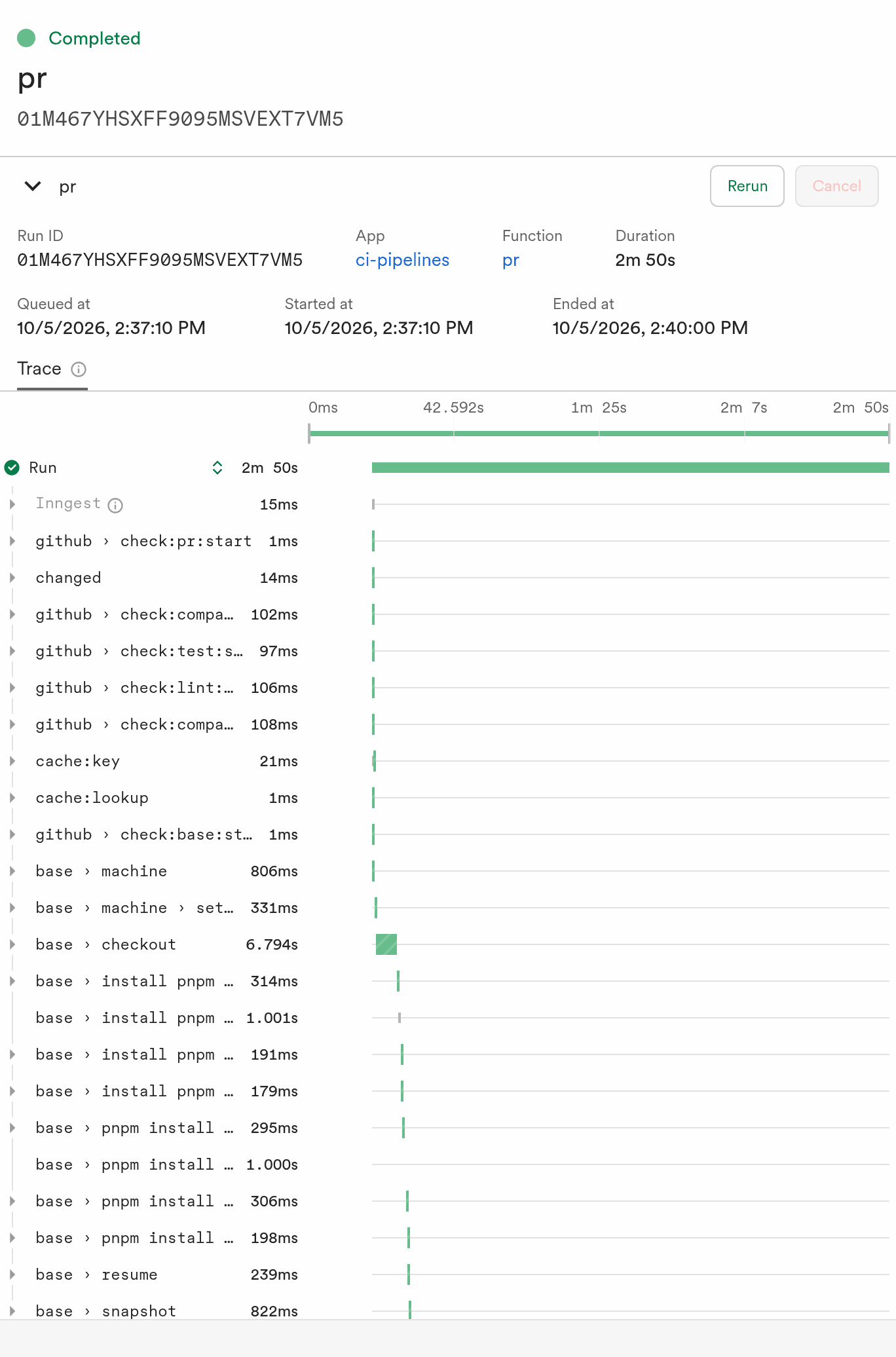
Every run also opens in the Inngest dashboard as one trace. It lists steps in the order they ran, and each step name starts with its job:
| Step | What it is |
|---|---|
base › machine | The job's Sandbox starting, followed by base › machine › setup |
base › checkout | The repository clone |
test › pnpm test | A command. Retries are test › pnpm test #attempt-1, #attempt-2, and so on, and a repeated command gets #2 |
github › check:test:start | A GitHub check update |
cache:key, cache:lookup | Cache lookups |
A job called a second time in the same run starts its steps with test (2), and has its own check.
Commands shows how .as() renames a command step. A GitHub "Re-run" on a check sends a new pull request or push event for the commit, so pipelines on those triggers run again. Passed jobs are reused only when they have a cache key.
In dev mode, checks print to your terminal. To report on GitHub, see Run on GitHub.
Next steps
- Reference lists every check state and report limit.
- Pipelines and triggers covers
ci.skip()and check options.