In every engineering discipline, a harness is the same thing: the layer that connects, protects, and orchestrates components — without doing the work itself. A wiring harness routes signals between an engine, sensors, and dashboard. A test harness provides the scaffolding that makes code repeatable and observable. A safety harness catches you when you fall.
Agent runtimes need the same thing. The LLM is the engine. Tools are the peripherals. Memory is storage. But what connects them? What catches the failure when the LLM times out on iteration five? What prevents two messages from colliding? What routes an event from a webhook to the right handler to the right reply channel?
That's the harness. And every agent framework is building one from scratch — their own retry logic, their own state persistence, their own job queues, their own event routing.
Durable, event-driven infrastructure already solves this. Every LLM call or tool call becomes a step — an independently retryable unit of work. If the process dies on iteration five, iterations one through four are already persisted. Events route triggers between functions. Concurrency controls prevent collisions. Step-level traces give you full observability over every iteration of the agent loop. The infrastructure is the harness.
We built Utah — Universally Triggered Agent Harness — to prove this out. A conversational Telegram or Slack agent with tools, memory, sub-agent delegation, and full durability. Minimal TypeScript, no framework. Just Inngest functions, steps, and events providing the harness around a standard think → act → observe loop. Think of it as a durable, cloud-ready OpenClaw.
The "universally triggered" part matters: Telegram or Slack webhooks, cron schedules, sub-agent invocations, inter-function events — the agent doesn't know or care how it was activated. The trigger is decoupled from the work. Add a Slack bot tomorrow and the agent loop doesn't change. The harness routes it.
Here's how it works.
The architecture
Here's what makes Utah different from most harnesses: it's event-driven and it decouples the orchestration from the agentic loop. It also leverages Inngest Cloud to bridge the gap between a public webhook and a local worker.
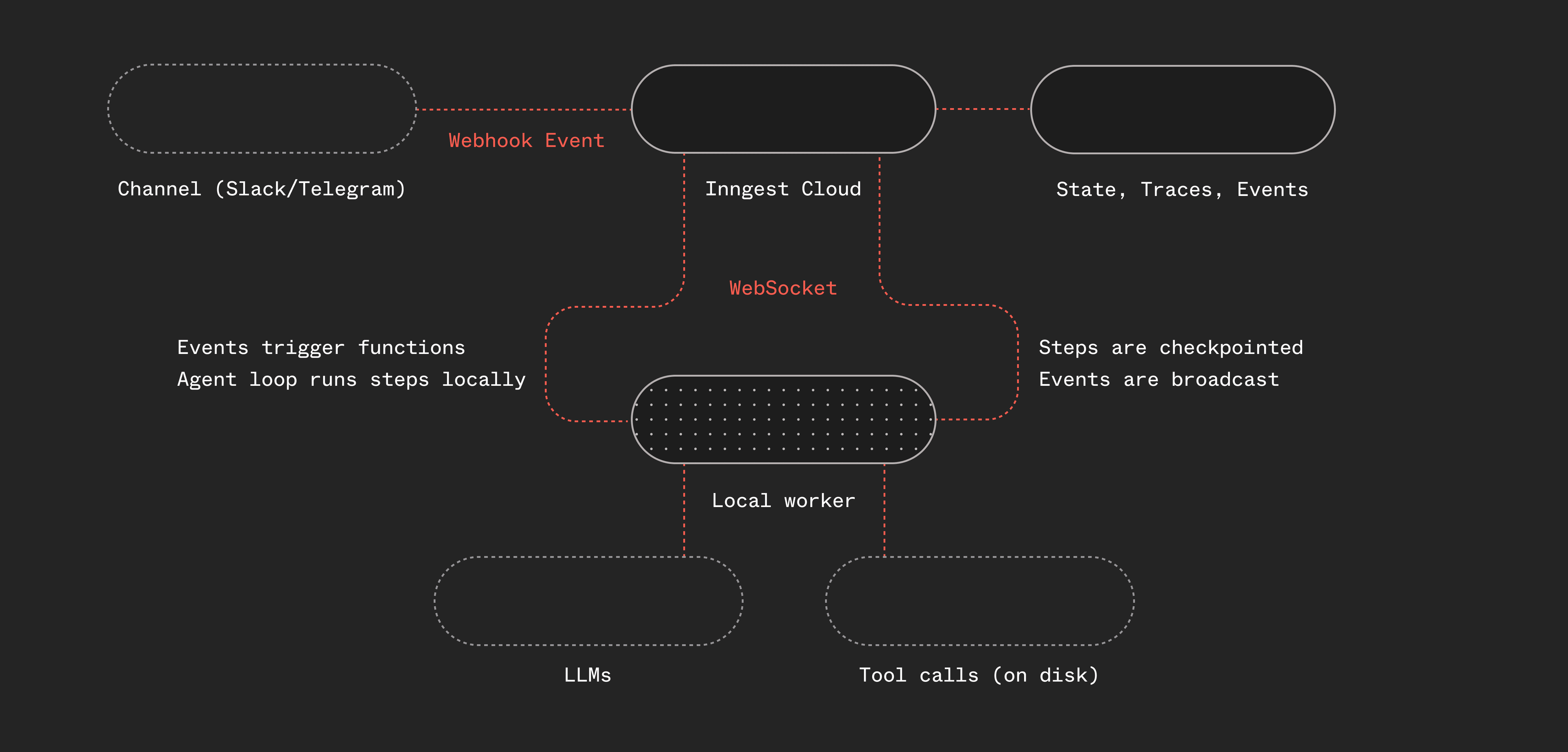
Telegram or Slack webhooks hit Inngest Cloud, where a webhook transform converts the raw http payload into a typed Inngest event. A worker running locally picks up the event, runs the agent function, and fires a reply event that triggers a separate function to send the response back through the channel's own API (more on this below). Any communication channel (or any service for that matter) that supports webhooks works.
The worker uses Inngest's connect() API which establishes a persistent WebSocket connection from your local machine (or a mac mini or a remote server) to Inngest Cloud, without needing a public endpoint.
The agent loop running in the worker is simple: it's a while loop with “steps” and the steps call LLMs and run tools. We use Pi's provider interface and their tools as they're both great, but you could use anything here. You could swap for AI SDK, TanStack AI, create your own tools or hook into MCP.
If it's local, why use Inngest? Why not just use OpenClaw?
OpenClaw, and the pi coding-agent libraries are an inspiration for this project. They both use in-process events internally, so events and orchestration are handled in memory. Inngest itself is an event-driven orchestration layer, so this project decouples the execution from the orchestration.
This enables a few things for the harness:
- The orchestration layer provides observability through traces and step-level inspection.
- Built-in durable execution provides reliability and retries.
- Decoupling lays the ground work for multi-player distributed agent orchestration.
- Event history provides an audit trail of what happened within the system.
- Scheduling is built in with crons or scheduled/delayed functions.
All of these problems are infrastructure problems, not AI problems.
The agent loop as steps
The core of Utah is a think → act → observe loop. Each iteration calls the LLM, checks if it wants to use tools, executes those tools, and feeds the results back. Here's the key insight: every LLM call and every tool execution is an Inngest step.
// Simplified — the actual implementation uses pi-ai's provider-agnostic typeswhile (!done && iterations < config.loop.maxIterations) {iterations++;// Prune old tool results to keep context focusedpruneOldToolResults(messages);// Budget warnings when running low on iterationsconst messagesForLLM = addBudgetWarning(messages, iterations);// Think: call the LLMconst llmResponse = await step.run("think", async () => {return await callLLM(systemPrompt, messagesForLLM, tools);});const toolCalls = llmResponse.toolCalls;if (toolCalls.length > 0) {messages.push(llmResponse.message);// Act: execute each tool as a separate stepfor (const tc of toolCalls) {const result = await step.run(`tool-${tc.name}`, async () => {validateToolArguments(tool, tc);return await executeTool(tc.id, tc.name, tc.arguments);});// Observe: feed results back into messagesmessages.push(toolResultMessage(tc, result));}} else if (llmResponse.text) {// No tools — the text response IS the replyfinalResponse = llmResponse.text;done = true;}}
A few things to note:
Inngest auto-indexes duplicate step IDs. When step.run("think") is called ten times in a loop, Inngest internally tracks them as think:0, think:1, etc. You don't need to manage unique step IDs yourself — the SDK handles it.
Each step is independently retryable. If the LLM API returns a 500 on iteration 3, Inngest retries that specific step. The results from iterations 1 and 2 are already persisted — they don't re-execute. This is durable execution doing exactly what it was designed for, just applied to an agent loop instead of a checkout workflow.
Text response means done. When the LLM responds with text and no tool calls, the turn is over. No explicit "done" signal needed.
For a step-by-step walkthrough of this pattern, see the agent tool loop guide.
You don't need to build your own tools
Utah doesn't hand-roll file I/O and shell execution. It pulls in pi-coding-agent — battle-tested tool implementations from the OpenClaw/Pi ecosystem:
read,write,edit— file operations with image support, binary detection, smart truncation (the edit tool is a standout for context windows)bash— shell execution with configurable timeout and output truncationgrep,find,ls— search and navigation respecting.gitignore
On top of those, Utah adds a few custom tools: remember (persist notes to a daily log), web_fetch, and delegate_task (more on that later).
The point: the tools story for AI agents is the same as any other software. Use existing libraries. Wrap them in Inngest steps. Done.
import { createReadTool, createWriteTool, createBashTool, /* ... */ } from "@mariozechner/pi-coding-agent";const tools = [createReadTool(config.workspace.root),createWriteTool(config.workspace.root),createBashTool(config.workspace.root),// ...];
Easy. Copy, paste, ready to go.
Six functions, not one monolith
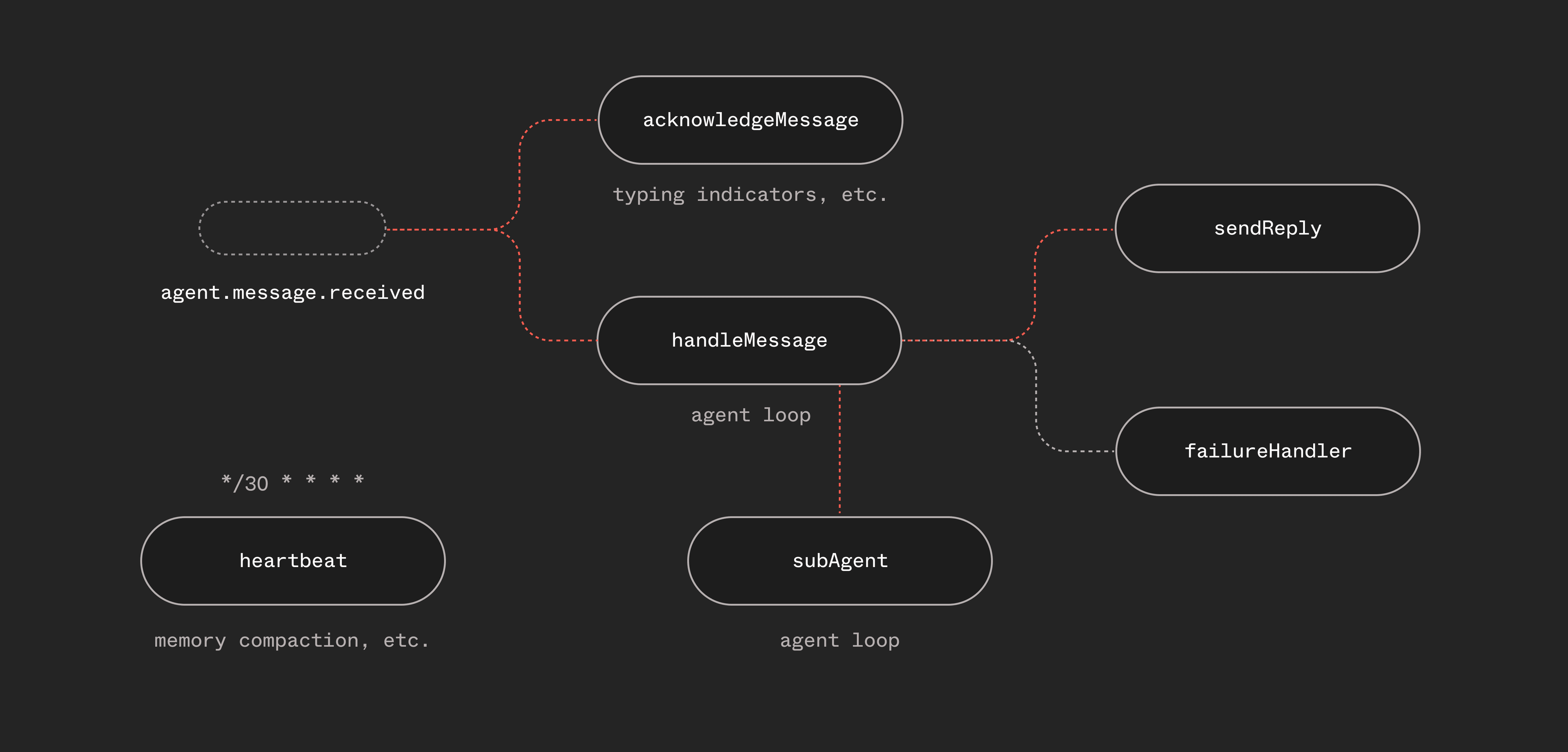
Utah isn't a single function that does everything. It's six functions that communicate through events:
const functions = [handleMessage, // The main agent loopsendReply, // Send responses back to the channelacknowledgeMessage,// Typing indicator — fires immediatelyfailureHandler, // Global error handler across all functionsheartbeat, // Periodic scheduled check-inssubAgent, // Isolated sub-agent runs via step.invoke()];
This separation matters. The typing indicator fires immediately when a message arrives — it doesn't wait for the agent loop. The reply function handles Telegram/Slack-specific formatting and error handling (like falling back to plain text when the LLM generates malformed HTML). The failure handler catches unhandled errors across all functions and notifies the user.
Each function has its own retry policy, concurrency controls, and trigger conditions. This is natural in Inngest — you're composing behavior from small, focused functions connected by events.
And that sendReply function? It can be triggered from anywhere, so if we wanted to allow a sub-agent or fanned-out workflow to send mid-loop replies to update the user, we can just send events from a new tool.
Sub-agents via step.invoke()
Sometimes the agent needs to do a task that's big enough to blow out its context window — refactoring a file, researching a topic, writing a document. With general purpose agents like OpenClaw that run in single threaded conversations (e.g. Telegram), some long running sessions over a couple of days can have issues with context windows. The answer: spawn a sub-agent.
Utah has a delegate_task tool. When the main agent calls it, it uses step.invoke() to fire up an entirely separate agent function run. Sub-agents fork the session's context into its own sub-session (with its own session key) with a focused task and outcome:
// In the main agent loop, when delegate_task is called:const subResult = await step.invoke("sub-agent", {function: subAgent,data: {task: tc.arguments.task,subSessionKey: `sub-${sessionKey}-${Date.now()}`,},});
The sub-agent function runs a fresh agent loop with its own context window, same tools (minus delegate_task — no recursive spawning), and returns a summary to the parent:
// Simplified sub-agentexport const subAgent = inngest.createFunction({ id: "agent-sub-agent", retries: 1 },{ event: "agent.subagent.spawn" },async ({ event, step }) => {const { task, subSessionKey } = event.data;const agentLoop = createAgentLoop(task, subSessionKey, {tools: SUB_AGENT_TOOLS, // No delegate_taskisSubAgent: true,});return await agentLoop(step);});
This is step.invoke() doing exactly what it was designed for — calling another Inngest function as a step, waiting for its result, and continuing. The sub-agent gets its own retries, its own step-level observability, its own durable execution. The parent agent just sees a tool result: "here's what I did."
Orchestration is handled. No agent-to-agent protocol needed. Just functions invoking functions.
Singleton concurrency: one conversation at a time
Each “channel” (e.g. Slack) uses a channel-specific session key to define what a “conversation” is. For single-threaded channels, like Telegram, it's the chat id, for threaded platforms, like Slack, it's channel and thread specific.
If multiple messages are sent in a conversation, you don't want the first agent loop to just keep running then the next one to respond — you want the agent to have the context of both messages. So you either need to cancel the first loop and let the second loop handle it, or you need to handle “steering” within your loop. For this project, we decided the cancel+restart was the cleanest loop as the loop is restarted with all of the context.
On the message handler function, we set a single line config to handle this:
singleton: { key: "event.data.sessionKey", mode: "cancel" },
Two things are happening:
- Singleton concurrency keyed on
sessionKey— only one agent run per chat at a time. No race conditions. No interleaved responses. - Cancel on new message — if the user sends a new message while the agent is still processing, the current run is cancelled and a new one starts with the latest message.
In a traditional setup, you'd need to build a queue per user, manage locks, and handle cancellation yourself. With Inngest, it's one line of configuration.
What we learned the hard way
Context management is the real challenge
The hardest problem wasn't calling the LLM. It was managing what goes into the LLM call.
Utah uses tools that might return thousands of characters per call. After a few iterations, the conversation context balloons, and the model starts losing track. We saw the agent loop endlessly calling tools without ever producing a response.
We fixed this with two-tier context pruning:
const PRUNING = {keepLastAssistantTurns: 3,softTrim: { maxChars: 4000, headChars: 1500, tailChars: 1500 },hardClear: { threshold: 50_000, placeholder: "[Tool result cleared]" },};
Old tool results get soft-trimmed (keep head + tail) or hard-cleared entirely when total context gets large. The last three iterations always stay intact.
On top of that, there's a separate compaction system for the session itself — when estimated tokens exceed a threshold, the conversation history gets summarized before feeding it into the next run. Pruning handles within-run context. Compaction handles across-run accumulation.
We also added budget warnings — system messages injected when the agent is running low on iterations, telling it to wrap up. And overflow recovery: if the LLM returns a context-too-large error mid-run, we force-compact the messages and retry without wasting an iteration. Between pruning, compaction, budget pressure, and overflow recovery, the agent stays on track.
Multi-provider LLM support
Utah doesn't call the Anthropic SDK directly. It uses pi-ai, a provider-agnostic LLM abstraction that supports Anthropic, OpenAI, and Google. Switching providers is a config change:
llm: {provider: "anthropic", // or "openai" or "google"model: "claude-sonnet-4-20250514",},
For the future, this also becomes interesting if sub-agents might evolve to use different models, potentially from different providers. A coding sub-agent could use Codex, while a research agent could use Opus. More on this to come.
Steering is an unsolved problem
When a user sends a new message while the agent is mid-run, what should happen? We use singleton — the current run is cancelled and a new one starts. This works, but any in-flight work is lost. The new run picks up from persisted session state, but it's not seamless. This is an area we're actively exploring.
Opportunity in streaming or mid-loop realtime updates
Each Inngest step is atomic — it runs, produces a result, and that result is persisted. This project doesn't yet include streaming or leverage Inngest's realtime functionality. Telegram and Slack support individual events, but we'd like to layer on a web app and a TUI for this project to explore how to optionally send mid-loop progress updates to a client that supports streaming. There's more to come in future iterations.
What we're exploring next
Utah's a personal single-player harness that runs locally on your machine or a server. The core architecture enables much more. Over the coming weeks we're exploring what it will take to make Utah truly multi-player.
To make it multi-player, we're going to explore swappable sandboxes, external state and memory. This would enable Utah to run on serverless if someone wanted to.
There are a lot of fun UX things we'd like to add built on the Inngest API and our Insights feature to build session monitoring for coding sessions. We will also explore using step.waitForEvent() to create human-in-the-loop approval flows when more input is needed.
The last piece that we're exploring to make this truly “universally triggered” is enabling Utah to write itself — building new agents and workflows, creating new webhooks, and monitoring itself via API. If you're interested, share some ideas on the GitHub repo.
Try it yourself
The Utah source code is published as a reference implementation: https://github.com/inngest/utah
It includes:
- The agent loop with Inngest steps and pi-ai's provider-agnostic LLM layer
- Tools from pi-coding-agent (read, write, edit, bash, grep, find, ls) plus custom tools
- Sub-agent delegation via
step.invoke() - Telegram and Slack webhook integration via Inngest webhook transforms
- Context pruning, compaction, and overflow recovery
- Session-aware singleton concurrency
Head over to the README to give it a try.
The agent loop pattern works for any conversational AI — Slack bots, Discord bots, support agents, coding assistants. Adding any new channel is just a webhook transform and a reply function away.
If you're building AI agents and hitting the same walls — state management, retries, concurrency, observability — give Inngest a try. The primitives you need might already exist.