If you’ve been on Twitter in the last few months, you know about OpenClaw. If you’ve been on Twitter and work at a B2B AI-enthusiastic company, you’ve been thinking about how to bring the power of personal agents to work (in a way that won’t get you fired).
The engineering team at Windmill, an HR and performance platform, was certainly thinking about this. So they built it. Replacing a brittle n8n-centric workflow, their new personal RevOps agent—Pim—now reliably handles everything from lead processing and call summarization to complex account-level automations, without constantly breaking down.
The full writeup from the team is on Twitter, but because Inngest was a key part of the rebuild, we thought it would be useful to share how Windmill did it, and how you can do the same!
Building a ‘suitable for work’ Clawd bot
Windmill already has a pretty forward-leaning product-led sales stack—Attio for CRM, Clay for enrichment, PostHog for analytics, Notion, Slack, Mailchimp, Stripe, etc. And like most AI-enthusiastic companies their size, they wanted to see what else they could do to get these tools to work together in a more value-compounding way.
So they started using n8n—a workflow automation tool that enabled the team to connect these tools into a chain of events. But it never quite worked as expected. As Ben stated in his writeup, “Once our ‘Sales Automations’ n8n flow broke for the 30th time, I knew it was time for a change.”
While the prospect of bringing in OpenClaw to create a more self-directing flow was pretty quickly dismissed—there was something here. Could Windmill build a ‘suitable for work’ OpenClaw replacement that would enable them to toss the DAG-driven orchestration that was failing them to date?
Personal agent vs. company agent
While OpenClaw was the inspiration for this project, there are some significant differences between a personal agent and a company-wide agent. A personal agent has a small blast radius, and a relatively low requirement for durability. If it fails, you probably haven’t lost much time, or trust. A company agent with access to your CRM, customer analytics, and internal communications is a different story.
Before writing any code, Windmill set four rules:
- No ingress internet access — No ports sitting open where any bad actor could reveal sensitive customer data.
- Observable — For any agent run, I should be able to see its train of thought, its tool chain, and any errors should be self-reported by the agent.
- Start small — If the primary goal was to make n8n agentic, then let's make n8n agentic, and not make a general purpose YOLO bot off the rip.
- Never more powerful than it needs to be
The immediate challenge: how do you trigger an agent from external events—Attio webhooks, Slack messages, cron schedules—without opening your network to the internet?
The solution: Inngest Connect
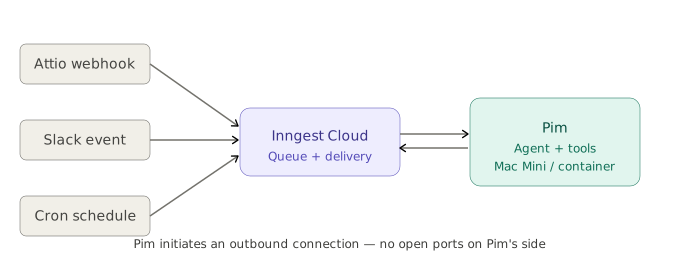
Windmill was already an Inngest customer for all of their distributed queuing needs, which is how Ben knew that Inngest Connect could be the answer he was looking for. Inngest Connect works by reversing the typical model. Instead of having Inngest call into your app, your app calls out to Inngest over a persistent outbound WebSocket connection. No open ports. No public URLs. No ngrok tunnels.
For Ben, the setup was “shockingly simple:”
connect({ apps: [{ client: inngest, functions }] })
With that (and a few other key layers we’ll cover next) Pim, Windmill's new internal ops agent, was born.
Pim processes leads, summarizes sales calls, compiles weekly account intelligence, triages product feedback, and answers questions from anyone on the team through Slack—with full context on how Windmill actually uses each tool and the whole team has come to rely on it.
How Pim is built
The first step was determining what context Pim should consider. The next, was to get it to connect the dots without explicit mappings.
Context files first, AI second
Before writing a single line of agent code, Ben built out context files: a core identity.ts, a windmill.ts describing the team, and dedicated files for Attio, ExaAI, Grain, Mailchimp, Attio, Mintlify, Notion, Posthog, Resend, and Slack.
This turned out to be the highest-leverage thing they did. MCPs tell Claude how to call a tool—input schema, output schema. They don't tell it how Windmill uses that tool. Which attributes live on which Attio object. Which Slack channels are high signal vs. noise. How leads flow in and where to set the source.
After 45 minutes of writing context files, Pim had better situational awareness of Windmill's stack than any individual teammate's Claude Code instance.
A simple, composable agent layer
The core agent is straightforward: Vercel AI SDK's ToolLoopAgent, wired to a model via OpenRouter, given a prompt and a toolset. Call .generate(), let the model run until it stops calling tools, extract from steps.
Tools follow a consistent pattern: a thin API wrapper (just the functions you need), Zod schemas for input and output, an execute function. Bundle them:
export const SLACK_TOOLS = {postSlackMessageTool,getSlackChannelHistoryTool,listSlackChannelsTool,getSlackUserTool,listSlackUsersTool,};
The lead processing agent
Pim's first real agent was triggered by Attio whenever a new lead came in. It would:
- Fetch the person's record from Attio
- Pull their PostHog session — UTMs, referrer, pages visited
- Research their LinkedIn and company background via Exa
- Post a rich Slack Block Kit notification to
#alerts-leads - Reply in-thread with deeper intel and ICP fit analysis
- If the lead source was unset, figure it out from research and set it in Attio
The prompt was a direct chain of instructions using the context files Max had already written. What used to require 10 minutes of configuring n8n HTTP nodes now required one line: "set the lead's source in Attio." The agent knew what that meant.
"I promptly shut off our lead-processor agent, which felt fantastic."
By the end of the week, Pim was handling: lead processing, sales call TLDRs, weekly account intelligence reports, drip campaign enrollment, SEO metric reporting.
Talking to Pim in Slack
It took Windmill just under a day to agent-ify all their “gross n8n flows.” The next step was making Pim conversational. The implementation — 563 lines, built between 12:30 and 2am on a Friday — worked like this:
At startup, Pim auto-provisions a Slack→Inngest webhook. A transform function converts Slack event payloads into pim/slack-message Inngest events. Events flow: Slack → Inngest webhook → Inngest Connect → Pim's function. No open ports anywhere.
Pim responds to DMs, @mentions, and replies in any thread that started with a request to it. The handler:
await slackApi.addReaction(channelId, messageTs, "eyes");const { tools, cleanup } = await loadChatTools(); // loads all MCP integrationsconst history = await collectThreadHistory(...);const result = streamText({model: openrouter(OPENROUTER_MODELS.claudeSonnet),messages: [...history, { role: "user", content: text }],tools: allTools,});const steps = await result.steps;await slackApi.postMessage(channelId, steps.at(-1).text, threadTs);await slackApi.removeReaction(channelId, messageTs, "eyes");
Load tools. Build messages. Stream response. Post the final text.
Pim now has access to Windmill's CRM, analytics, meeting recordings, help docs, Notion, and marketing data—all through a Slack thread. Everyone on the team speaks the same language.
How to build this yourself
The three things that make this work:
- Connect at startup, not via inbound webhook. One line replaces an open port. Your agent calls out to Inngest; Inngest delivers everything back over that connection — crons, webhooks, Slack events, all of it.
await connect({apps: [{ client: inngest, functions: [processLead, morningReport] }],});
- Write context files before writing tools. An agent with a thin system prompt will hallucinate your CRM structure, post to the wrong Slack channel, and set fields that don't exist. A context file that describes exactly how your team uses each tool costs 45 minutes and fixes most of that before it happens.
- Give each agent only the tools it needs. Pim's lead processing function gets Attio tools and Slack tools. The cron report gets Slack tools and PostHog tools. Nothing gets everything. Tighter tool sets mean fewer wrong decisions and faster runs.
Why this works
Windmill's decisions compound well together.
No ingress means even if Pim's credentials were somehow compromised, there's nothing reachable from the outside. Inngest Connect means crons, webhooks, and Slack events all arrive over a connection Pim initiates—the network stays closed. Context files mean every agent run starts with the same shared understanding of Windmill's stack, regardless of who triggered it. Starting with one broken flow meant the stack was proven in production before anyone depended on it for anything critical.
A few weeks in, Pim handles real business operations and the whole team trusts it enough to route questions directly to it.
"Questions I previously had to field now just go to Pim."
Get started
Inngest Connect is available in Public Beta now. If you're running an agent on a long-lived server—a Mac Mini, a container, a VM—it's the straightforward path to triggering it from the outside world without opening your network.