A run is only as reliable as the work inside it—including the sandbox used to test the code.
Today's sandboxes live outside the durable execution chain. They can't see the run that called them, so they pause on idle timers instead of the run's waits, and retrying a failed operation is left to your code. We’re changing that. Inngest Sandboxes are now in open beta for every Pro plan and above: isolated microVMs you create as steps inside your existing functions, where your durability primitives are already defined.
Set one up in minutes, in any existing TypeScript app: just add sandboxMiddleware() to your Inngest client and call step.sandbox.create() in a function. There's no second account, API key, or client to set up, and the first run lands on the trace you already use. To see it work before writing any code, open the playground: pick a command, inject a failure, and watch the step retry.
A sandbox is a step
Two of the most important traits of a sandbox are ease of creation, and boot time. Inngest sandboxes boot in under a second, and are as easy to add as the APIs you already know. Create, use, and destroy a Sandbox with the step API you already know. Add sandboxMiddleware() to your Inngest client, and every function gets step.sandbox. Each operation takes a stable step ID, the same way step.run does:
export const runTests = inngest.createFunction({ id: "run-tests", triggers: { event: "agent/patch.ready" } },async ({ event, step }) => {const sandbox = await step.sandbox.create("create-sandbox", {name: `job-${event.data.jobId}`,vcpu: 1,memoryMb: 1024,});const result = await sandbox.commands.run("run-tests",["npm", "test"],{ cwd: "/workspace/repo", timeout: "5m" },);await sandbox.destroy("destroy-sandbox");return result.stdout;},);
Every Sandbox call retries and replays like any other step. Inngest memoizes each result, so when the function resumes after a later step, Create returns the Sandbox it already made instead of booting a second one. A failed operation retries under its own step ID, and the retry appears as another attempt on that step.
Memoization records API results, not the machine itself. Files and processes inside a Sandbox end when the Sandbox does, so anything that has to outlive it goes to external storage.
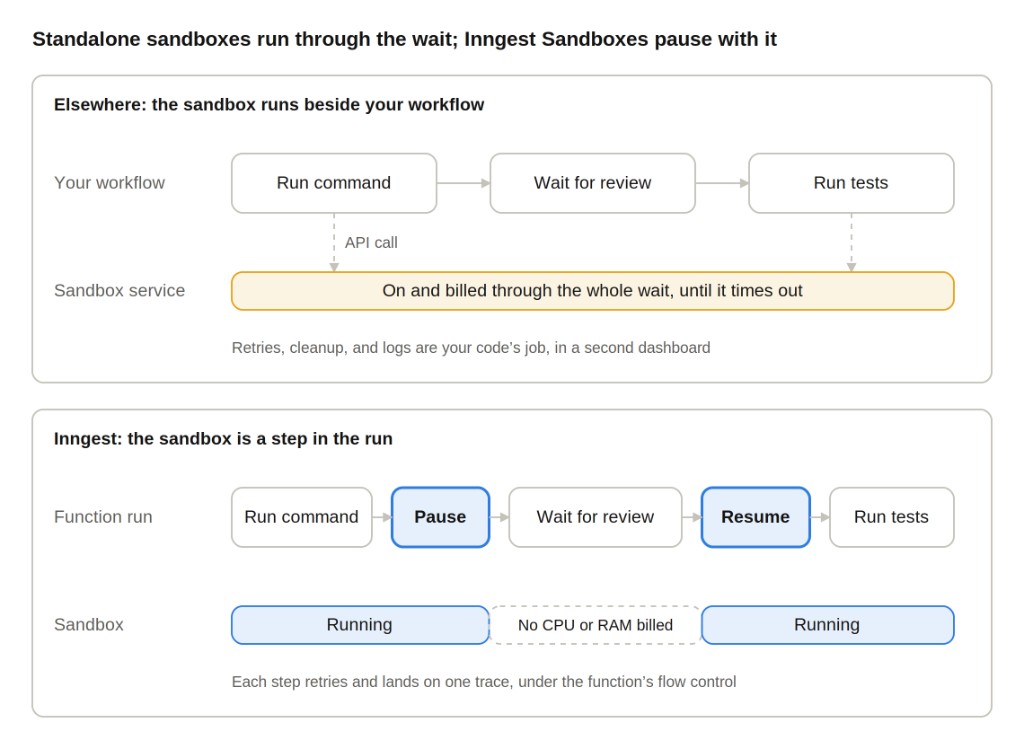
Because the Sandbox is a step, it can stop when the run does. A standalone sandbox stays on through every wait in the workflow that called it, while an Inngest Sandbox pauses as a step, holds no CPU or RAM while the run waits, and resumes when the run does.
Pause while the run waits
Your Sandbox can hold no compute while the run waits, just like the function around it. Pause it before the wait and resume it after:
await sandbox.commands.run("apply-patch", "git apply /tmp/patch.diff");const paused = await sandbox.pause("pause-sandbox");const approval = await step.waitForEvent("wait-for-review", {event: "review/approved",timeout: "7d",if: "async.data.jobId == event.data.jobId",});const running = await paused.resume("resume-sandbox");await running.commands.run("run-tests", ["npm", "test"]);
Resume returns the same machine, not a rebuilt one. Pause releases the live runtime and checkpoints the Sandbox. Resume restores it under the same ID, with its filesystem, memory, processes, environment, resources, and network identity intact, and paused time doesn't count against its active runtime.
Reconnect network clients after you resume. Pause is a cold transition, so open external connections can drop.
Pause your bill with the run
With any sandbox provider, the bill is driven by idle time, not boot time. Wherever they run, agent sandboxes spend most of their life waiting on model calls, reviews, and webhooks, and most providers, Inngest included, bill for that waiting whenever the sandbox is running.
Inngest Sandboxes cut that bill in two ways. First, every running second costs less:
| CPU per vCPU-hour | Memory per hour | |
|---|---|---|
| Inngest | $0.0396 | $0.0108 per GB |
| E2B | $0.0504 | $0.0162 per GiB |
| Modal | $0.0710 | $0.0240 per GiB |
Second, a Sandbox stops billing CPU and RAM the moment the run starts a long wait. E2B can pause a sandbox too, but its automatic pause fires on an idle timer, so the bill runs until the timer does. An Inngest Sandbox pauses as a step on the run's own wait, so the CPU and RAM bill stops when the wait begins, not when a timer runs out. Short idle stretches inside a running command, like waiting on a model call, are still billed.
The smallest Inngest Sandbox, 1 vCPU with 1 GB, costs about five cents for a full hour of active runtime. A Sandbox paused through a day-long review isn't billed for CPU or RAM while it waits.
A forgotten Sandbox can't run up an open-ended bill. Each one is created by a step in a run, so its ID, its operations, and its Destroy step sit on that run's trace, and a leftover machine is one you can find. Active runtime is capped at one hour per Sandbox, which bounds what a missed cleanup can cost. During the beta, cleanup is still a step you write: end the success path with Destroy and add an onFailure handler for runs that fail permanently.
Build once, clone per job
Snapshots let you pay for setup once and reuse it across every job. Pause continues a single Sandbox, while a snapshot saves a prepared state that new Sandboxes start from. Install your tools once, snapshot the environment, and clone a worker per unit of work:
await builder.commands.run("install", "pip install --quiet duckdb", {timeout: "5m",});const environment = await builder.snapshot("snapshot-environment");const worker = await environment.clone(`clone-${i}`, {name: `dataset-${runId}-${i}`,});
A failure in one clone reruns that clone and nothing else. Each clone has its own step ID, so a failed file in a batch retries without repeating the install or touching its siblings. The original Sandbox stays in place.
One system, not two
Everything you've configured for a function already applies to its Sandboxes. A standalone sandbox is another client, account, and set of logs to reconcile with the run that called it. Here the Sandbox is a step, so it inherits the function's limits, trace, and evals.
Flow control. Your concurrency limit caps how many machines a burst can boot. Concurrency, throttling, and the function's other limits govern Sandbox usage, so a spike in agent runs boots as many machines as the limit allows, not one per event.
Traces. A failed command shows up next to the logic that ran it. create-sandbox, run-tests, and destroy-sandbox appear on the function trace beside every other step, with their inputs, outputs, and errors.
Evals. Generated code gets scored in the same function that ran it. A new prompt only counts if the code it writes still passes, so run each test case in a Sandbox and score the result with defer() to credit the experiment that produced it:
const result = await sandbox.commands.run(`case-${i}`,'printf %s "$INPUT" | python3 -c "$CODE"',{ environment: { CODE: code, INPUT: test.stdin }, timeout: "5s" },);defer("score", {function: passRate,data: { code, cases },experiment: experimentRef,});
Inngest CI is built the same way. The Labs project runs each CI job on its own Sandbox, with the job, the machine, and the result in one function.
What's in the beta
The open beta is available on Pro plans and above, in the TypeScript SDK. Python and Go are planned.
| Beta today | |
|---|---|
| Boot time | Under a second |
| Sizes | 1 vCPU / 1024 MiB, 2 / 2048, or 4 / 4096 |
| Active runtime | One hour per Sandbox; paused time doesn't count |
| Operations | Create, commands, background processes, pause, resume, snapshot, clone, destroy |
| Secrets | Select existing workspace secrets by name at Create |
| Files and live logs | Upload, download, and streaming through the direct inngest.sandboxes client |
One of the biggest benefits of a durable sandbox that lives in your execution layer is the cost savings compared to other providers: You only pay for a Sandbox while it's running. CPU is $0.000011 per vCPU-second and RAM is $0.000003 per GB-second, so the smallest size, 1 vCPU with 1 GB, comes to about five cents for a full hour of active runtime. A Sandbox paused through a day-long review isn't billed for CPU or RAM while it waits.
SSH, persistent mounts, and a one-call TypeScript helper come next. SSH gives you access to a running Sandbox, S3-backed mounts share files across Sandboxes and their clones, and step.sandbox.typescript starts a Sandbox, runs TypeScript, and stops it in a single call.
Cleanup is your function's job during the beta. step.sandbox.create() doesn't destroy the machine for you, so make Destroy the last step on the success path and add an onFailure handler for runs that fail permanently.
The fastest way in is the playground. Open it to inject a failure and watch a Sandbox step retry, then follow the quick start to add one to your app.