Concurrent steps (or slots, or runs) in durable execution refer to the amount of work that can run at the same time. If your concurrency is set to 100, work will fan out across all of them until filled, and a backlog builds. That's great if you're averaging ~50 concurrent runs at any given time, but not so great if a sudden burst takes you well over that ceiling.
Bursty concurrency changes what happens at that limit. Starting today, Inngest will burst you 3x past your capacity ceiling (as set by your current plan), for a total of one hour, every month. By running "surprise" work rather than letting it build a backlog, Inngest lets you:
- Keep things moving when unexpected events occur.
- Better assess what your monthly concurrency should be set to.
If you want to know how it works, or how to increase your concurrency, read on!
What does concurrency mean in Inngest?
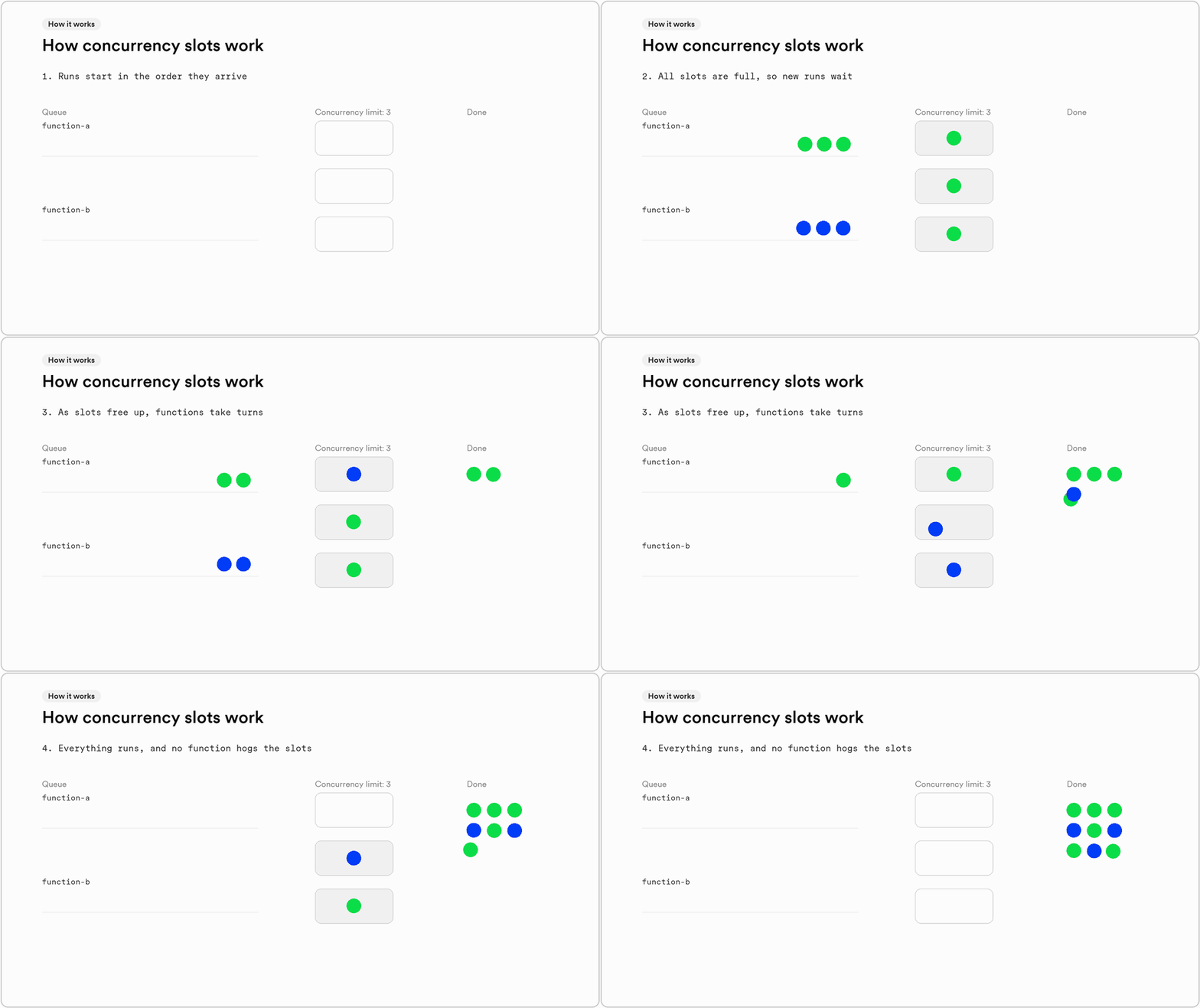
Concurrency is the number of steps actively executing at once. It decides how fast work gets done: whether a thousand simultaneous report requests finish in a minute, or the last one waits twenty.
Important note: runs that have wait-for steps don't count. A run that's sleeping, waiting for an event, or paused between steps holds no slot. An agent waiting three days for a human approval uses no concurrency until it has work to do.
Why does concurrency spike?
Concurrency climbs when work arrives faster than it finishes. It's a totally normal function of growing products, and usually a sign your product is being used, not a sign something is wrong!
- Fan-out: a 20,000-row CSV upload triggers 20,000 runs.
- Webhook floods: a provider replays its backlog after an outage.
- Scheduled jobs: nightly syncs, reports, and billing all start at midnight UTC.
- Backfills and big imports: a new customer brings their whole history on day one.
- Branching agents: one run fans out into parallel tool calls and sub-agents.
However, concurrency can also climb when steps slow. If your LLM provider's latency doubles, every step calling it holds its slot twice as long, with no change in traffic.
How does a traditional queue handle spikes?
In a traditional job queue, when a spike outpaces your concurrency, you can either wait it out, or add workers, which means provisioning for a peak you've never measured and may never see again.
But waiting is also risky. A job that pauses for an API response or a human approval usually holds its worker the whole time, unless you split it into separate jobs and wire the handoff yourself.
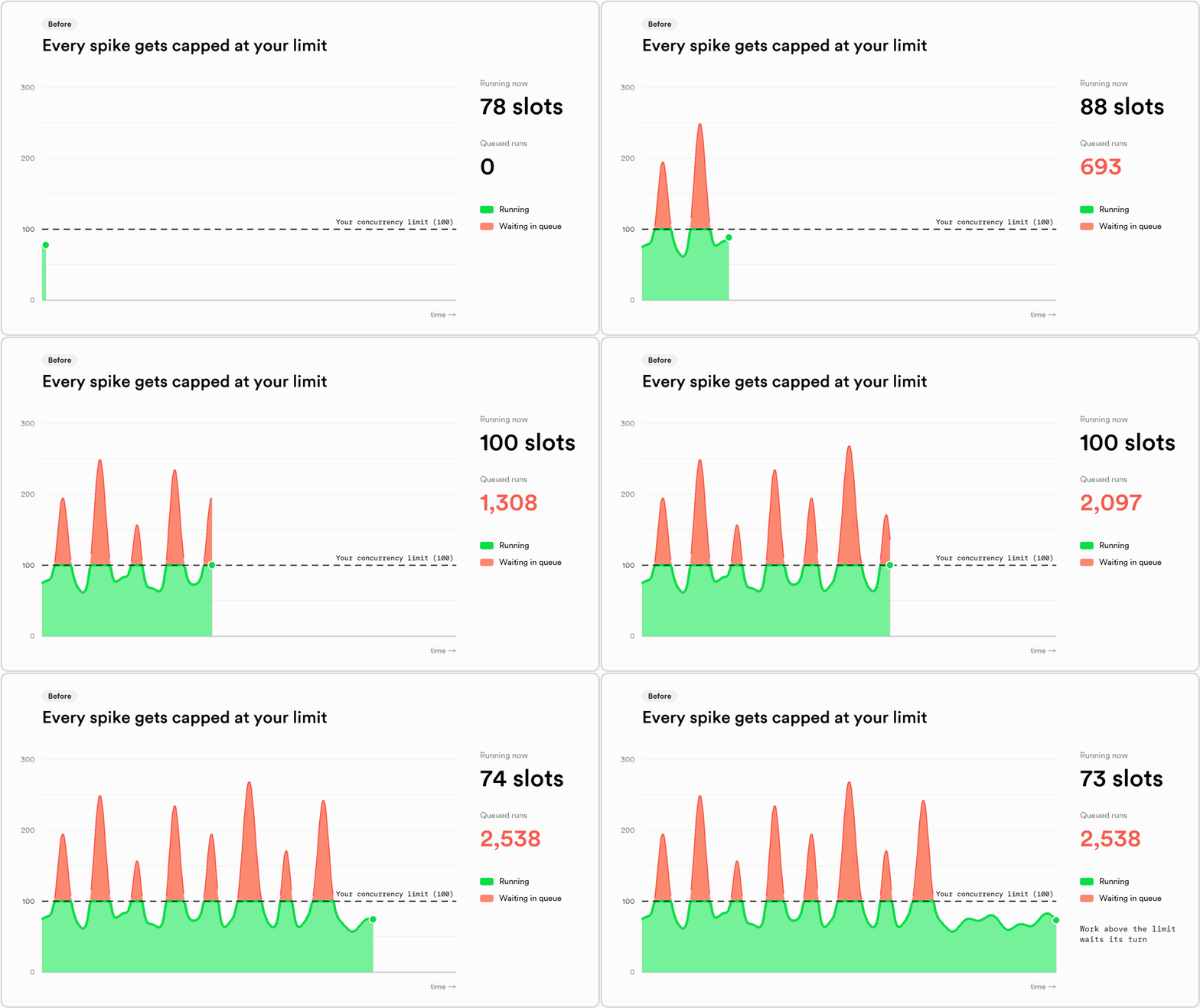
Inngest also used to behave similarly—if you hit the concurrency limit you've set for your account, additional work would queue up until slots became available.
How does bursty concurrency work?
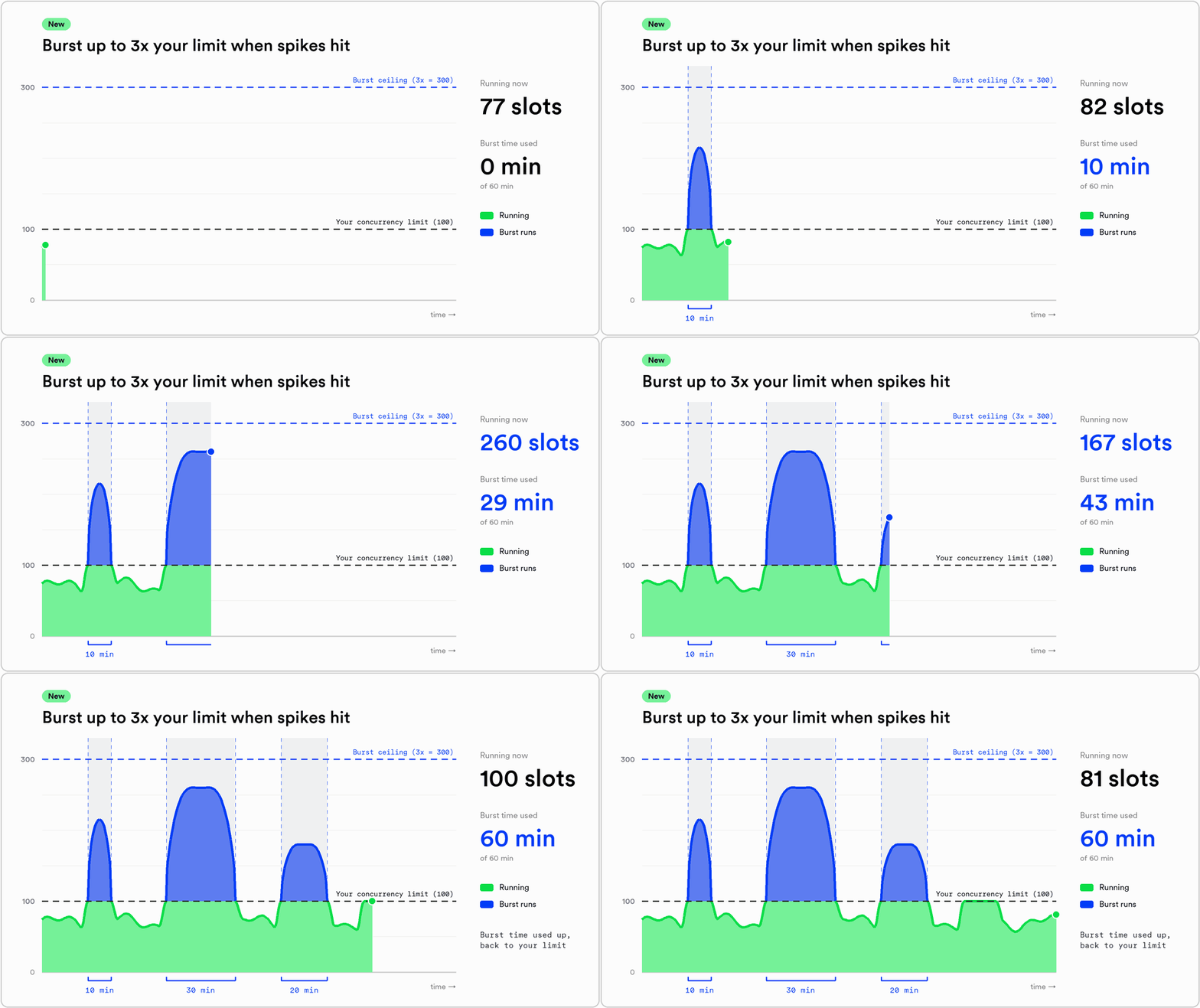
Imagine an account with a plan limit of 100 and normal load around 30. Now imagine that account gets an import that fans out to 250 concurrent steps for 20 minutes.
In a traditional queue you wait or provision. In Inngest, you used to process the first 100, and wait on the next 150. Now, with a 3x ceiling and an hour-long burst window, all 250 steps are processed at once.
It also works for shorter bursts across the month. A 10-minute burst beyond limits gets covered, the burst concludes when the spike stops, and you have 50 more minutes on the month if needed.
This makes a few things better:
- The spike gets headroom when it starts. The start of a burst raises the account limit immediately. You don't have to predict which function(s) will spike, or by how much.
- The spike gets measured. How far you burst is the gap between your limit and your real peak. If you expect this to happen month after month, you should add concurrency to cover that peak.
- You'll get notified when you're close to exhausting the hour. Notifications at 25%, 50%, 75%, and 100% of the budget, so upgrading is a planned decision.
- Free every month. A burst helps avoid slowdowns, but it's really a tool to ensure you can right-size your concurrency limit going forward. You will never be charged for a burst, or for concurrency that you didn't add yourself in the app.
How does the burst budget work?
Pro and above accounts get one hour of burst per month, which we hope will be helpful in sussing out what's a fluke and what needs real attention.
- Size: 3x your account concurrency limit at the start of each burst.
- Counting: Minutes. Each minute in which steps start using burst spends one minute of your monthly 60, however many steps start.
- Refill: Bursts are reset every month, at a time unique to your account.
- Notifications: Admins will receive an email at 25%, 50%, 75%, and 100% of the burst, but you can also monitor in the app.
What should you do with that number?
If you burst rarely, and don't go past your temporary 3x ceiling, you likely don't have to add concurrency. If it happens every month, or you "spend" your 60 minutes before month end, your workload has likely outgrown your limit. Add concurrency on your billing page. If your peak is ever above 1,000, it's likely you would benefit from Enterprise pricing.
Note: Function-level concurrency you set overrides bursts, which means if applied, a burst would not be triggered.