Background work almost always runs against something with a limit. Your database can only handle so many heavy queries at once, and database connections are already in short supply. Each agent run holds a sandbox or a GPU. And each partner API only accepts a limited number of requests per minute. So you cap how much runs at once, and when more work arrives than that cap allows, it waits in a queue.
Waiting can be ok—but not having control over who waits the longest, isn't:
- One customer's import stalls everyone. A customer uploads 50,000 contacts. Every other customer's sync sits behind it for an hour.
- One power user hogs the AI agents. A single user kicks off 200 agent runs, and everyone else's requests wait for those to finish.
- A nightly job delays live users. A cron job fans out 10,000 tasks at midnight. A user who clicks "Export" at 12:05 waits behind all of them.
- Paying customers wait behind free trials. An enterprise customer with a turnaround SLA lines up behind a flood of free-plan requests.
None of these runs fail, but they did make for a pretty bad experience for at least one user that shouldn't have been punished by another.
Long-running work worsens this issue. If each run is an AI agent, a video render or a multi-hour sync, for example, every slot stays busy for minutes or hours, and the line barely moves. The longer your work runs, the higher the risk for poor customer experience.
Two commonly confused features of Inngest can help. This blog explains when to use each.
Why a basic queue can't fix this
First, let's talk about your alternative, which might just be a basic queue. It's gotten you this far, so let's see how it does with matters of fairness.
A basic queue like SQS, or a Redis-backed job queue, gives you one line, and workers pull from the front. Some add a few fixed priority levels. None of them know which customer a job belongs to, so there's no way to say "don't let one customer take every slot."
The usual workarounds are a queue and a worker pool per customer, which you have to provision, scale and pay for as you add customers, or a separate "high priority" queue, which only handles fixed tiers and can leave the low queue waiting indefinitely. Either way, you end up building a scheduler.
In Inngest, this is configuration on the function:
| Question | Inngest feature | What it does |
|---|---|---|
| Who waits? | Concurrency keys concurrency.key | Gives each customer (or user, or tenant) its own queue with its own limit, so one customer's backlog only delays that customer. |
| When do they go? | Priority priority.run | Moves runs earlier or later within a queue based on data in the event, like plan or source. |
Both only matter when there's a backlog. Concurrency limits count steps that are actively executing, so a run paused on step.sleep() or step.waitForEvent() doesn't hold a slot. The waiting described below is work that's ready to run and waiting for a free slot.
Who waits: give each customer their own queue
Say you run a reporting product with an Inngest function called generate-report. It calls an expensive downstream service, so you cap it at two concurrent steps. One morning, Acme kicks off a bulk export and sends five report/requested events at once. A second later, Globex asks for two reports.
With one shared queue, the runs are processed in the order they arrived. Acme's five runs take every slot, and Globex waits behind a burst that has nothing to do with it. This is the noisy neighbor problem.
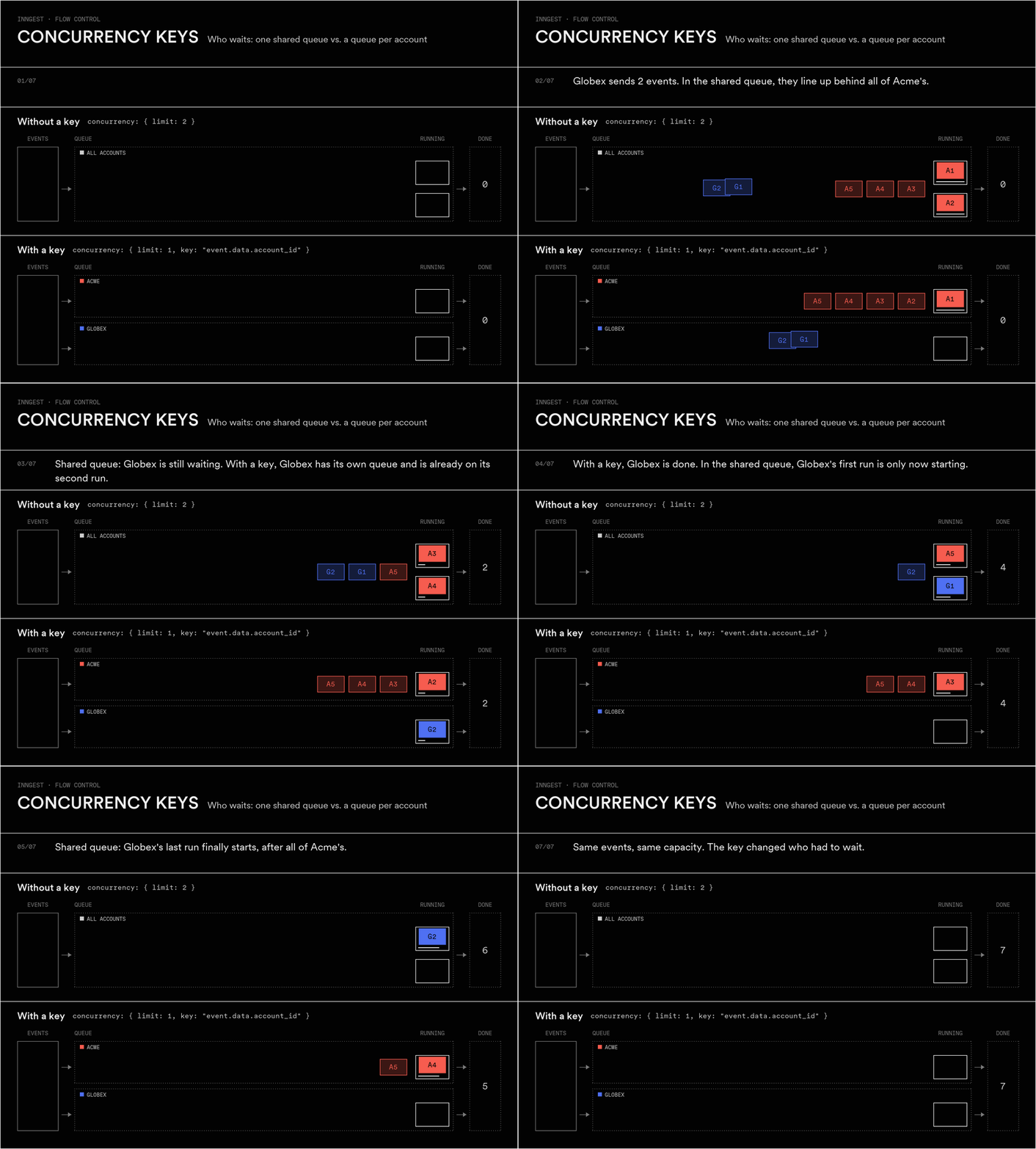
Figure 1 · Concurrency keys. Each box is one run, labeled by account (A for Acme, G for Globex). Runs move from Events to Queue to Running to Done. Outlined boxes are waiting; solid boxes are running.
Adding a key to the concurrency setting changes the shape of the queue. Inngest evaluates the key expression against each triggering event and creates a separate queue for every unique value. The limit applies to each queue on its own, and Inngest pulls work from all of them, so Globex no longer sits behind Acme's backlog.
inngest.createFunction({id: "generate-report",concurrency: {limit: 1,key: "event.data.account_id", // one queue per account},},{ event: "report/requested" },async ({ event, step }) => {/* ... */});
Notice what happens to Acme in Figure 1: its burst takes longer to clear, because it can only run one report at a time now. If that's too strict, raise the per-key limit. To keep a ceiling on the downstream service too, add a second limit across all accounts:
concurrency: [{ key: "event.data.account_id", limit: 2 }, // per account{ limit: 10 }, // across all accounts],
Use a concurrency key when one customer, user or tenant can create enough work to delay everyone else. Good keys are whatever identifies who the work is for:
event.data.account_idfor multi-tenant SaaS, so each customer gets a fair share.event.data.user_idfor AI agents or per-user jobs, so one user's 200 runs don't block the rest.event.data.account_id + "-" + event.data.integrationto give each customer's connection to a third-party API its own queue.
The limit is per key value, so ten accounts with limit: 2 can run up to twenty at once unless a second limit caps the total. A key applies to one function by default. Set scope to "env" or "account" to share the same queues across several functions that hit the same resource.
Is your limit a rate instead? If what you're up against is requests per minute, like an LLM provider's token limit or an API that returns 429s, use throttling. Concurrency caps how many steps run at the same time. Throttling caps how many runs start in a period. It also takes a key, so each customer gets their own rate, and runs over the limit wait in a queue rather than being dropped:
throttle: {limit: 10,period: "1m",key: "event.data.account_id", // 10 runs per minute, per account},
When they go: let important work move up
Now a different problem. Your enterprise customers pay for faster report turnaround, but they share one queue with thousands of free-plan users. Free requests arrive steadily and a backlog builds. When an enterprise request arrives, it lines up behind everyone else.
A key wouldn't help here. Splitting by plan would set aside capacity for enterprise customers whether they need it or not. You want enterprise requests to move up the line whenever there is one. That's what priority does.
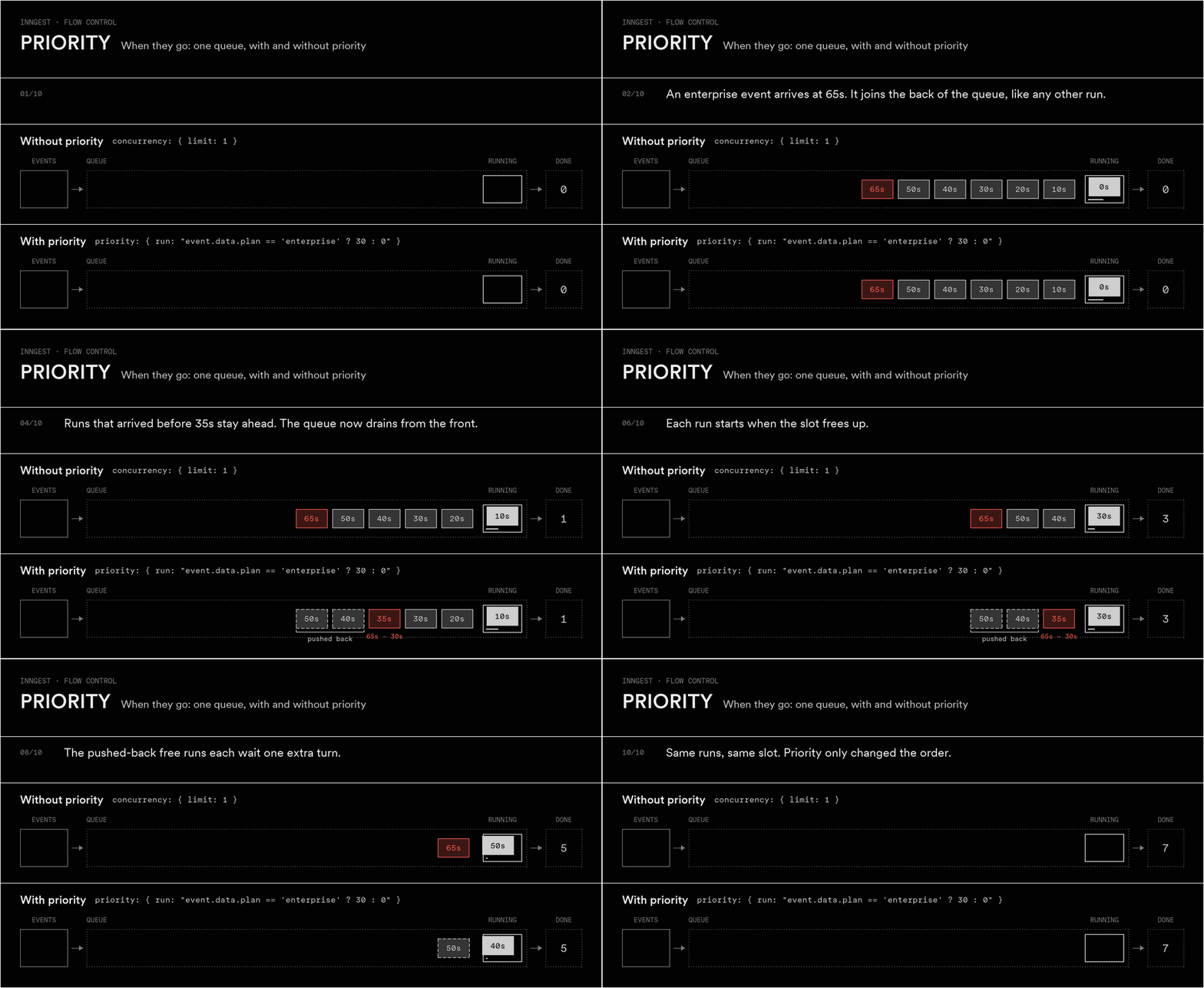
Figure 2 · Priority. Each box is one run, labeled with the time its event arrived. Grey boxes are free-plan runs and the salmon box is an enterprise run. The front of the queue is on the right, next to Running.
Priority is an expression that returns a number of seconds, from -600 to 600. A positive number tells Inngest to treat the run as if it had arrived that many seconds earlier. A negative number treats it as later. Zero leaves it where it is.
inngest.createFunction({id: "generate-report",concurrency: { limit: 1 },priority: {// enterprise runs act as if they arrived 30s earlierrun: "event.data.plan == 'enterprise' ? 30 : 0",},},{ event: "report/requested" },async ({ event, step }) => {/* ... */});
The enterprise run in Figure 2 doesn't jump to the front. It only passes free runs that arrived less than 30 seconds before it. A free run that has already waited longer stays ahead. Because of that limit, a steady stream of high-priority work can't hold low-priority work back forever.
Use priority when some runs should go sooner than others in the same queue:
- Plan tiers.
event.data.plan == 'enterprise' ? 60 : 0gives paying customers faster turnaround. - People before background jobs.
event.data.source == 'dashboard' ? 120 : 0lets work someone is waiting on in the UI go ahead of scheduled jobs. - Backfills that should yield.
event.data.backfill ? -300 : 0uses a negative number to push re-processing behind live traffic.
Priority doesn't add capacity. When one run moves up, the runs it passes wait a little longer.
Which feature for which scenario
| Scenario | Use | Example |
|---|---|---|
| One customer's bulk import delays every other customer | Concurrency key | key: "event.data.account_id" |
| One user's AI agent runs block other users | Concurrency key | key: "event.data.user_id" |
| Several functions hit the same customer's database or API | Concurrency key with scope | scope: "env", key: "event.data.account_id" |
| A provider allows N requests per minute, per customer | Throttling with a key | throttle: { limit: 10, period: "1m", key: "event.data.account_id" } |
| Paid plans should get faster turnaround | Priority | run: "event.data.plan == 'enterprise' ? 60 : 0" |
| User-triggered work waits behind scheduled jobs | Priority | run: "event.data.source == 'dashboard' ? 120 : 0" |
| Backfills slow down live traffic | Priority, negative | run: "event.data.backfill ? -300 : 0" |
| Each customer needs a cap, and urgent work first within it | Both | See below |
Using both together
The two features work together. The key decides which queue a run joins, and priority decides its place in that queue. Once runs are split by account, ordering by plan stops mattering, because everyone in a queue is the same customer. Ordering by the kind of work still helps. A report someone is waiting on in the UI should go ahead of the same account's nightly batch:
inngest.createFunction({id: "generate-report",concurrency: [{ key: "event.data.account_id", limit: 2 },{ limit: 10 },],priority: {// interactive requests go ahead of scheduled ones from the same accountrun: "event.data.source == 'dashboard' ? 120 : 0",},},{ event: "report/requested" },async ({ event, step }) => {/* ... */});
Acme's bulk export can no longer crowd out Globex. When someone at Acme clicks "Generate report" during that export, their request moves up Acme's own queue.
Getting started
- Find the field that says who the work is for. Usually an account, user or tenant ID on the event. That's your concurrency key.
- Set the per-key limit. Start with what one customer should be allowed to use at once, and add a second, keyless limit if the downstream resource needs a total ceiling.
- Find the field that says how urgent the work is. Plan, source or a backfill flag. Turn it into a priority expression in seconds.
- Watch it under load. Runs waiting on a limit show up as queued in the Inngest dashboard, so you can see who's waiting and adjust.
There are no per-customer workers to deploy and no extra queues to provision. For the full reference, see the concurrency guide and the priority guide. For per-minute limits, see the throttling guide. If your problem is the amount of work rather than who waits for it, look at debounce and batching.