Our Insights feature was late. Very late. We'd built this SQL-based query tool for analyzing function execution data, but didn't see the adoption rate we expected. The problem was obvious: you needed to know SQL and understand our schema just to ask basic questions about your data.
So we did what everyone does in 2025, we threw AI at it.
This is the story of how we shipped Insights AI, what we learned about building agentic features, and why dogfooding your own infrastructure actually works.
The feature nobody used
Insights launched as a way for customers to query their Inngest execution data. Want to know your p99 latency for a specific function? Write a SQL query. Need to see error patterns? Write another query.
It was powerful if you knew how to use it. The problem was that the learning curve was steep. You had to understand our specific schema and query patterns before you could get anything useful out of it.
We needed natural language queries. Ask a question in whatever language you think in, get back data with the answer. We'd seen how AI-powered analysis tools let people ask plain questions about their data and knew that's what people expected.
The real pressure point came when we realized adoption wasn't improving. We needed to reduce the learning curve to near zero. If someone could type "what are my slowest functions?" and get a meaningful answer, we'd actually have a useful feature.
We also needed to show some thought leadership in AI. Our customers are building AI-powered applications. They needed to see we could do it too.
AgentKit seemed like the answer
We started with our own AgentKit and OpenAI's models. AgentKit is our framework for building multi-step agent workflows. It handles the orchestration while you focus on the logic.
The architecture looked good on paper:
- User asks a question in natural language
- Agent analyzes the question and our schema
- Agent writes a SQL query
- Agent executes the query
- Agent formats the results
We built a prototype. It was slow and the responses were bad.
Two major issues emerged:
Speed. The agent was making 8-12 API calls per query. Each call introduced network latency. Total time from question to answer: 15-30 seconds. That's unusable.
Quality. OpenAI's responses weren't detailed enough. The agent would write queries that were technically valid but semantically wrong. It would confuse column names, misinterpret time ranges, or generate queries that returned no results.
The prompt engineering was our weakest link. We'd written basic system prompts. A few sentences about the task and some schema details. That worked for simple demos but fell apart with real user questions.
Three fixes that actually worked
We made three changes that transformed the feature from prototype to production.
Switch to Anthropic
We moved from OpenAI to Claude. Specifically, Claude Haiku and Sonnet 4.5. We used Haiku for the two simpler steps: selecting relevant event names and summarizing the query. We used Sonnet for the heavy lifting, writing the actual query.
The quality improvement was immediate. Claude's context window handling and instruction following made it better at understanding our schema and writing correct queries. Where GPT-4 would hallucinate column names or misunderstand join relationships, Claude got it right more often.
We didn't do a formal A/B test, but the difference was visible in ad-hoc testing. Pull the old system prompts, run 50 test questions, and the success rate jumped from maybe 50% to 90%.
Enable checkpointing
This was the speed fix.
Normally, Inngest does a full request/response cycle back to the platform after each step to store state. That's fine for most workflows, but for agents making 8-12 sequential LLM calls, the latency between steps adds up fast. Checkpointing cuts that out entirely. The SDK orchestrates steps locally on your server and executes them immediately, sending progress back to Inngest without waiting around between steps.
Before checkpointing: 15-30 seconds per query After checkpointing: 3-6 seconds per query
Below are screenshots of trace timings with and without checkpointing. These were run on a local dev server, so network latency is at an absolute minimum. Even then, checkpointing is nearly 30% faster. In production, where requests are traveling across the internet between your servers and Inngest's platform, that gap gets significantly wider. With checkpointing enabled (left), you see tight execution with minimal gaps between steps. Without it (right), those gaps are all network latency and request/response processing time.
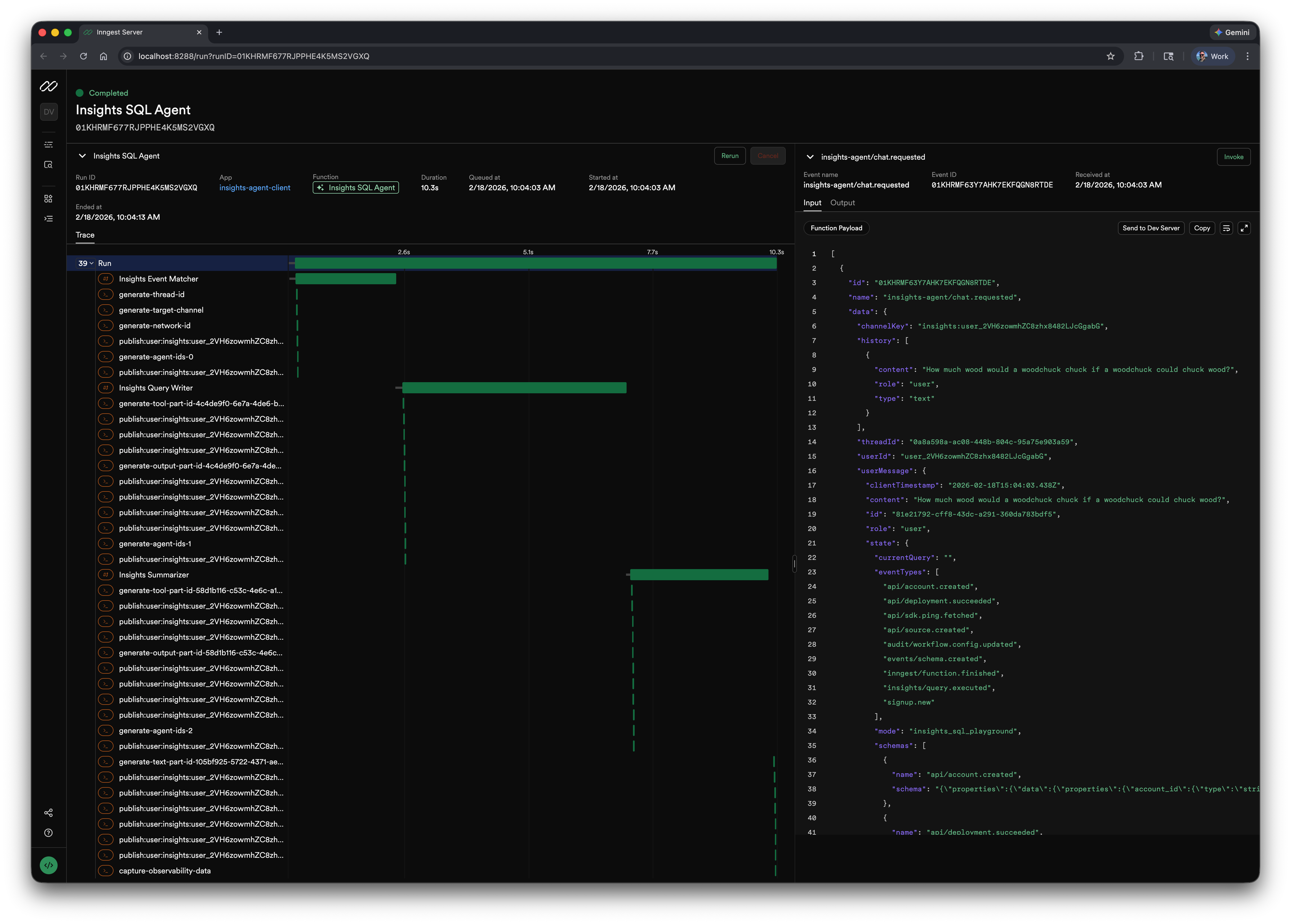
checkpointing enabled
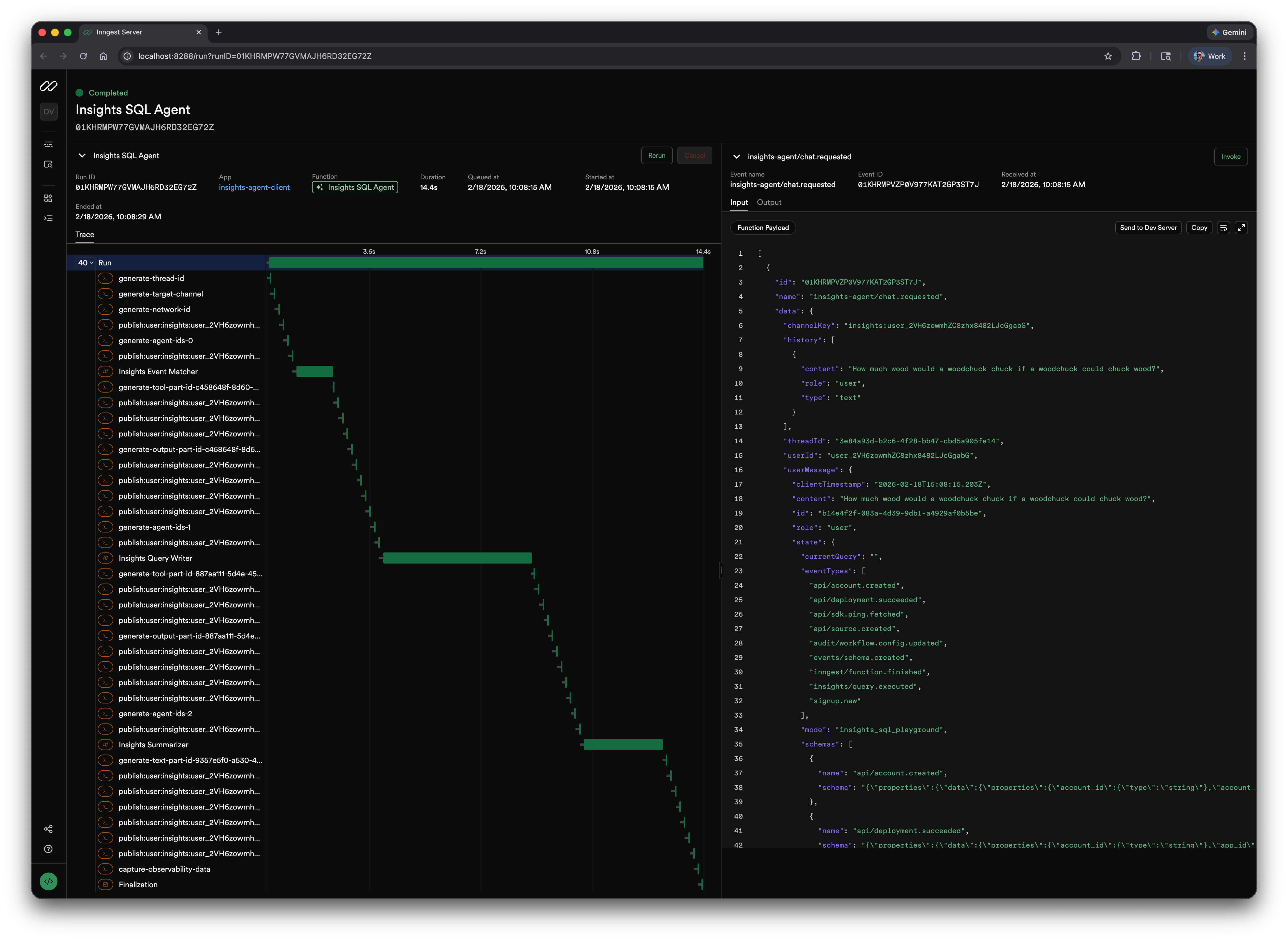
checkpointing disabled
Write better system prompts
This took the most iteration.
Our initial prompts were too vague. We told the agent "write a SQL query to answer the user's question" and included a schema dump. That's it.
Modern prompt engineering requires being stupidly explicit. You need to tell Claude exactly what you want, why it matters, how to handle edge cases, and what output format you expect.
Here's what we learned:
Define every term. Don't assume the model knows your schema. Spell out every column, its type, and its quirks. Our query-writer prompt explicitly defines each column in the events table, including that ts and received_at are in milliseconds, not seconds. That single detail prevents an entire class of wrong queries.
Provide examples. Lots of them. Our query-writer prompt includes examples for basic filtering, time filtering with both INTERVAL and millisecond timestamps, numeric JSON extraction, and aggregation with HAVING. Our event-matcher prompt walks through a full reasoning chain: "User: 'Why are payments failing?' → Reasoning: payment_failed is a direct match. gateway_timeout is a likely root cause semantic match. → Selection: ['payment_failed', 'gateway_timeout']." Without these, the model guesses. With them, it follows a proven pattern.
Specify output format precisely. Different agents need different formats. The query-writer outputs raw SQL only. No explanation, no markdown. The summarizer uses structured markdown with specific headers like ### SQL Breakdown and ### Summary, and we explicitly tell it: "Your response must be valid markdown and ONLY markdown. Do not use any XML tags." For structured inputs, we use XML tags like <current_query>, <selected_events>, and <event_schemas> so the model can clearly distinguish between context sections.
Handle ambiguity with concrete rules, not vague instructions. Instead of saying "ask a clarifying question," we give the model decision trees. Our event-matcher has an entire section on when not to select events. If the user asks "How many events do we have?" it should return an empty array, not guess. Our query-writer has a detailed rubric for deciding whether to modify an existing query or write a new one, with explicit signal lists like: "Modification signals: 'add', 'remove', 'change', 'also', 'but', 'of those', 'from these results'..."
The prompts got longer. From maybe 100 words to over 2,000. But the results got dramatically better. We went from "sometimes works" to "usually works" to "almost always works."
Anthropic's research on prompt engineering emphasizes this. Clear, explicit instructions work better than clever tricks. Few-shot examples improve quality. Chain-of-thought reasoning helps with complex queries.
We applied all of it.
Fix with AI
Once we had a working agent for generating queries, we realized we could use the same system for another problem.
People writing SQL queries in our editor would make mistakes. Syntax errors, wrong table names, invalid joins. They'd see an error message and either give up or spend time debugging.
We added a "Fix with AI" button.
Click it. The agent reads your query, reads the error, figures out what's wrong, and suggests a fix. Most of the time it works.
The implementation was straightforward because we already had the agent infrastructure. We just needed a different prompt focused on debugging rather than generation.
What this changed
The feature went from theoretical to practical.
Before Insights AI, you needed to know SQL and our schema. Adoption was limited to our most technical users.
After Insights AI, anyone can ask questions about their data. "Show me functions that failed in the last hour." "What's the p99 latency for my checkout flow?" The agent handles the translation.
We're seeing better engagement with the Insights feature overall. People who wouldn't have touched the SQL editor are now running queries regularly.
The Fix with AI feature reduced frustration for people who were trying to write custom queries. Instead of giving up when they hit a syntax error, they can get instant help.
For us as a team, this validated that we can build AI features. Our customers are building agentic applications on Inngest. They need to know we understand what that takes. Shipping Insights AI showed we're not just talking about AI. We're using our own platform to build it.
What we'd do differently
If we were starting over, a few things would change.
Start with better prompts from day one. We wasted time with vague system prompts. The resources were already out there. Anthropic's docs, community examples, proven patterns. We should have studied those first instead of learning by trial and error.
Test model providers earlier. We assumed OpenAI was the default choice because it's what everyone uses. We should have prototyped with multiple providers from the start. The quality difference between models matters more than we expected.
Build observability first. We added detailed logging and tracing partway through. Should have been there from the beginning. When agent responses are bad, you need to see exactly what prompts went in, what came back, and where things went wrong.
The tools we used
The full stack for Insights AI:
- Inngest for agent orchestration and checkpointing
- Claude Haiku and Sonnet 4.5 for LLM inference
- TypeScript for the agent logic
- ClickHouse for the data we're querying
- React for the frontend
Everything runs on Inngest. The agent workflow is just an Inngest function that calls Claude via the Anthropic API. Checkpointing handles state management. If something fails, the function retries automatically.
For teams building similar features, Inngest handles the hard parts of agent orchestration: retries, state management, observability, and concurrent execution. You write the logic, we handle the infrastructure.
Practical takeaways
If you're building an AI-powered query tool or agentic feature, here's what mattered for us:
Model quality matters more than you think. Don't just default to OpenAI. Test Claude, test Gemini, see what works for your use case. We got materially better results with Claude for structured query generation.
Checkpointing is not optional for agents. Multi-step workflows with sequential API calls will be slow without it. The latency compounds quickly. Inngest's checkpointing removed that bottleneck. IMO, I'd enable it on everything.
Prompt engineering is real work. Spend time on it. Read the docs. Look at examples. Be explicit about what you want. The difference between a 100-word prompt and a 2,000-word prompt with examples and clear structure is night and day.
Dogfooding works. Building Insights AI on Inngest forced us to find rough edges in our own platform. We fixed them. Now our customers benefit from those improvements.
Start simple, iterate. We didn't ship a perfect feature on day one. We shipped something that worked well enough, watched how people used it, and improved based on real feedback.
The code for Insights AI is in our open source repo: github.com/inngest/inngest. You can see the agent implementation, the prompts, and how we wired it all together.
If you're working on similar problems or want to talk through your agent architecture, find me in the Inngest Discord.
And if you need to add durability to serverless and event-driven workflows without infrastructure hell, check out inngest.com.