Building a production AI image app involves two distinct problems.
The first is inference: running models fast, reliably, and at scale. fal.ai is built for this. It provides access to Flux, SDXL, and hundreds of other models through a single API, handles GPU provisioning and scaling, and delivers results faster than most teams could manage on their own infrastructure.
The second is workflow orchestration: coordinating everything around the inference call. Submitting a job and resuming execution when the result arrives. Retrying a failed upload without re-running a generation you've already paid for. Ensuring one user's batch jobs don't slow down everyone else's real-time requests. Knowing exactly what happened when a job doesn't complete.
Inngest handles this layer. It's a durable execution platform that coordinates the steps around your fal.ai calls — suspending execution while a job runs, resuming when the result arrives, retrying individual steps on failure, and giving you full observability across the pipeline.
The two tools compose naturally because they solve different problems. This post walks through how to wire them together into a full media production pipeline.
How fal.ai Handles Async Image Generation
For production workloads, fal.ai's recommended approach is their queue API: submit a job, get a request_id back immediately, and receive the result via webhook when generation completes. This is a well-designed async model — it scales cleanly and keeps your server decoupled from inference time.
But it also creates a natural coordination challenge: the user's request starts in one HTTP call and the result arrives in a separate webhook later.
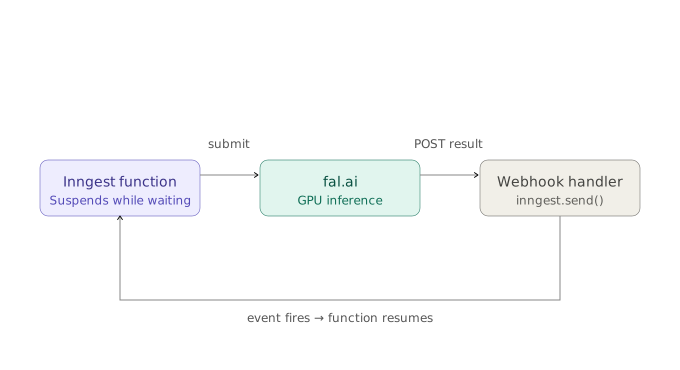
step.waitForEvent is how Inngest bridges that gap. The function submits to fal.ai, suspends at zero cost, and resumes the moment the webhook result arrives — with no polling, no state table, and no correlation logic to write.
Setting Up the fal.ai Webhook Handler
The webhook handler's only job is to verify fal.ai's signature and translate the payload into an Inngest event. Keeping it this thin means one endpoint handles every fal.ai model you add. Full signature verification examples are in the fal.ai webhooks documentation.
// POST /api/webhooks/falapp.post("/api/webhooks/fal", async (req, res) => {const body = req.body;// verify fal.ai signature here using X-Fal-Webhook-Signature headerawait inngest.send({name: body.status === "OK" ? "fal/job.completed" : "fal/job.failed",data: {requestId: body.request_id,imageUrl: body.payload?.images?.[0]?.url ?? null,error: body.error ?? null,},});res.sendStatus(200);});
Inngest routes each event to the correct waiting function run using the requestId match — no application state needed in the handler.
Building the Image Generation Pipeline with Inngest
Here's the complete function: user submits a prompt, fal.ai generates the image, it gets stored in S3, status updated in the database.
import { Inngest, NonRetriableError } from "inngest";import { fal } from "@fal-ai/client";const inngest = new Inngest({ id: "my-app" });export const generateImage = inngest.createFunction({id: "generate-image",triggers: [{ event: "image/generate.requested" }],concurrency: { limit: 3, key: "event.data.userId" },retries: 3,},async ({ event, step }) => {const { prompt, userId, jobId } = event.data;// Step 1: Submit to fal.ai — returns immediately with request_idconst { requestId } = await step.run("submit-to-fal", async () => {const { request_id } = await fal.queue.submit("fal-ai/flux/dev", {input: { prompt, image_size: "landscape_4_3" },webhookUrl: `${process.env.APP_URL}/api/webhooks/fal`,});return { requestId: request_id };});// Step 2: Suspend here — zero compute consumed while fal.ai generates.// Resumes when the webhook fires the matching Inngest event.const result = await step.waitForEvent("wait-for-fal", {event: "fal/job.completed",timeout: "10m",if: `async.data.requestId == "${requestId}"`,});if (!result) {throw new NonRetriableError(`Generation timed out for job ${jobId}`);}// Step 3: Store the image permanently.// If this step fails and retries, fal.ai is not called again —// requestId and result are already memoized from the steps above.const s3Key = await step.run("store-image", async () => {const res = await fetch(result.data.imageUrl);const buffer = Buffer.from(await res.arrayBuffer());const key = `images/${userId}/${jobId}.jpg`;await s3.send(new PutObjectCommand({Bucket: process.env.S3_BUCKET,Key: key,Body: buffer,ContentType: "image/jpeg",}));return key;});// Step 4: Mark completeawait step.run("complete", () =>db.jobs.update({where: { id: jobId },data: { status: "completed", s3Key },}));// Step 5: Send notification to the userawait step.run("send-notificaiton", async () => {await inngest.realtime.publish({channel: `user:${userId}`,topic: 'image-generation',data: { status: 'complete', jobId, s3Key }})});return { jobId, s3Key };});
Your API route fires an event and returns immediately — the pipeline runs in the background:
app.post("/api/generate", authenticate, async (req, res) => {const jobId = crypto.randomUUID();await db.jobs.create({ data: { id: jobId, userId: req.user.id, status: "pending" } });await inngest.send({name: "image/generate.requested",data: { jobId, userId: req.user.id, prompt: req.body.prompt },});res.json({ jobId });});
What it looks like all together:
What You Get in Production
This is where the combination of fal.ai and Inngest pays off in ways that matter for a real production product.
Step-level retries protect your inference costs.
Each step.run is a checkpoint. The result of every step is memoized once it completes. If the S3 upload on step 3 fails and retries, fal.ai doesn't run again — requestId and result are already stored. At $0.03–$0.08 per image this matters at any meaningful scale. NonRetriableError tells Inngest not to retry when retrying genuinely can't help — like a generation timeout.
Per-user fairness comes from one line of config.
The concurrency key in the function config gives each user their own virtual queue. A user submitting a 500-image batch doesn't delay anyone else's real-time request — Inngest manages per-user queuing dynamically without any additional infrastructure. This is the noisy neighbor problem that every multi-tenant image app runs into eventually. There's a detailed writeup on how Inngest solves it, and the concurrency documentation covers stacked limits, plan-tier differentiation, and scope options.
Observability comes free from the step model.
Because each step is a named checkpoint, the Inngest dashboard shows a full execution trace for every job: which steps ran, what each returned, how long each took, and exactly where something failed. When a user reports a stuck generation you can see immediately whether the fal.ai job is still in flight, the S3 upload failed, or everything completed. No extra instrumentation needed. SoundCloud uses this same pattern for their video generation pipelines, and execution visibility was central to why they moved to Inngest.
Understanding why step-level memoization works this way is worth reading in depth — the durable execution documentation and the principles of durable execution both go deep on the model.
How This Pattern Scales With Your Product
The architecture above doesn't need to change as your product grows more complex — only the steps inside the function do.
If you add post-processing — upscaling the generated image, removing the background, adding a watermark — each additional fal.ai call gets its own step.run and step.waitForEvent. Each is independently memoized. A failure on the fourth step doesn't re-run the first three.
If you add custom model training — letting users train Flux LoRA models on their own images for AI headshots, brand assets, or product photography — the same pattern handles jobs that run 15–30 minutes. The function suspends for the full training duration, resumes when fal.ai completes, runs a test generation to verify the model, and notifies the user. The fal.ai LoRA training models use the same queue and webhook pattern as generation — the only difference is the timeout on step.waitForEvent is longer.
In both cases, the webhook handler stays the same, the Inngest event stays the same, and the step structure stays the same. The pattern is the infrastructure. The business logic is what changes.
Ready to build your own? Get started with Inngest for free