Most AI agents don't crash spectacularly — they fail silently. A tool returns bad data and the loop keeps going. An LLM call times out mid-turn and you get a partial answer that looks complete. Rate limits, invalid tool arguments, and swallowed errors look like success until a user notices days later. That's the AI agent reliability problem: without step-level visibility and solid AI agent error handling, you can't tell where the agent went wrong.
Most tutorials stop at the happy path — call the LLM, run a tool, loop. But the moment you ship an agent to production, you hit those silent failures: tool calls fail, providers rate-limit you, long-running tasks time out, and you can't see what the hell happened when something goes wrong.
This post walks through building an agent that handles all of that. We'll cover the agent loop, durable tool execution, observability, and sub-agent delegation with real code. (For a higher-level look at durable context management and debugging, see our companion guide.)
You'll need an LLM provider (Anthropic, OpenAI, whatever) and TypeScript. The patterns work regardless of which model SDK you use.
Three Primitives — All You Need
If you're new to Inngest, here's the short version: any AI agent is really just a series of steps. An LLM call is a step. A tool execution is a step. Saving data is a step. Inngest makes each step durable — tracked, retryable, and resumable if something crashes — which is how you get durable AI agents instead of silent failures.
You only need three primitives to build a full agent:
step.run()- Execute a unit of work durably. Use it for LLM calls, tool execution, saving data - anything you don't want to re-do if the function restarts. Eachstep.run()is memoized: if the function resumes after a failure, completed steps return their cached results instantly.step.invoke()- Call another Inngest function and wait for its result. This is how you delegate work to a sub-agent synchronously. The parent function pauses (no compute burned) until the child finishes and returns.step.sendEvent()- Emit an event that triggers other Inngest functions. This is fire-and-forget: the current function keeps going, and the triggered function runs independently. Use it for async work, sending replies, or scheduling future tasks.
That's it. Everything in this post builds on those three. Let's go.
Setting up Inngest for AI agent development
If you’re just getting started with Inngest, you’ll need Node.js 18+ and a free Inngest account. Framework-specific quickstarts for Next.js, Node.js, and Python are in the docs if you need them.
pnpm add inngest
Initialize a client:
import { Inngest } from "inngest";export const inngest = new Inngest({ id: "ai-agent" });
To run functions locally, start the Inngest dev server alongside your app:
# Install the CLI — follow the steps to complete install:curl -sSfL https://cli.inngest.com/install.sh | sh# Run the dev servernpx inngest-cli@latest dev
Then serve your functions over HTTP. Here's a Next.js example — the pattern is the same for Express, Hono, or any other framework:
// app/api/inngest/route.tsimport { serve } from "inngest/next";import { inngest } from "@/inngest/client";import { handleMessage } from "@/inngest/functions";export const { GET, POST, PUT } = serve({client: inngest,functions: [handleMessage],});
The dev server auto-discovers your functions at http://localhost:3000/api/inngest and gives you a local dashboard where you can trigger events, inspect step traces, and replay runs. That dashboard is what you'll use to observe the agent behavior covered later in this post.
In production, you deploy the same serve handler and connect your Inngest app to the cloud dashboard — no separate infrastructure.
The Agent Loop
Now let’s dig in. Every agent is a loop. Think → act → observe → repeat. The LLM decides what to do, you execute the tool, feed the result back, and let the LLM decide again. It keeps going until the model responds with text instead of a tool call. (For a concise reference, see the agent tool loop pattern guide.) Simplifying, often in agents you’ll do the following steps:
- Load context - Build the system prompt using the goal of your agent and any other helpful context it may need.
- Load history (Optional) - Pre-load any recent history from conversations if you're building a conversational agent.
- Add the user message - Typically you'll have a user input or similar that you'll use to kick off the loop.
- The loop
- Think - Call the LLM itself.
- Execute tools - Call the tool and append to the messages array.
- Handle result - Reply to the user, save the result, etc.
Here's the core structure:
export function createAgentLoop(userMessage: string, sessionKey: string) {return async (step: StepAPI, logger: Logger) => {// Load context and history as durable stepsconst systemPrompt = await step.run("load-context", async () => {return await buildSystemPrompt();});let history = await step.run("load-history", async () => {return await buildConversationHistory(sessionKey);});// Build the message array from history + the new user messageconst messages: Message[] = [...history.map(toMessage),{ role: "user", content: userMessage, timestamp: Date.now() },];let iterations = 0;let done = false;let finalResponse = "";while (!done && iterations < config.loop.maxIterations) {iterations++;// Think: call the LLMconst llmResponse = await step.run("think", async () => {return await callLLM(systemPrompt, messages, tools);});const toolCalls = llmResponse.toolCalls;if (toolCalls.length > 0) {messages.push(llmResponse.message);// Act: execute each toolfor (const tc of toolCalls) {const toolResult = await step.run(`tool-${tc.name}`, async () => {return await executeTool(tc.id, tc.name, tc.arguments);});// Observe: feed result backmessages.push({role: "toolResult",toolCallId: tc.id,toolName: tc.name,content: [{ type: "text", text: toolResult.result }],isError: toolResult.error || false,});}} else if (llmResponse.text) {// No tools requested — we're donefinalResponse = llmResponse.text;done = true;}}return { response: finalResponse, iterations };};}
The loop itself is just a while loop. Nothing fancy. The key is what wraps it.
Every LLM call is step.run("think", ...). Every tool execution is step.run("tool-{name}", ...). This means Inngest tracks each iteration, and if the function crashes mid-loop — say on iteration 7 after 4 tool calls — it resumes from the last completed step. Not from the beginning. You don't re-execute the LLM calls you already paid for, and you don't re-run the tool calls that already wrote to disk.
That's durability. It's not retry logic you bolt on after the fact. It's the execution model.
Why the loop is a returned function
Notice that createAgentLoop returns a function that takes step and logger. This is intentional - it lets you re-use the same loop from different Inngest functions (the main message handler, sub-agents, etc.) while keeping the step API wired in correctly.
The Main Function: Handling Messages
The agent loop runs inside an Inngest function triggered by an event:
export const handleMessage = inngest.createFunction({id: "agent-handle-message",retries: 2,triggers: [agentMessageReceived],singleton: { key: "event.data.sessionKey", mode: "cancel" },},async ({ event, step, logger }) => {const { message, sessionKey } = event.data;// Save the incoming messageawait step.run("save-incoming", async () => {await appendToSession(sessionKey, "user", message);});// Run the agent loopconst agentLoop = createAgentLoop(message, sessionKey);const result = await agentLoop(step, logger);// Save the responseawait step.run("save-response", async () => {await appendToSession(sessionKey, "assistant", result.response);});// Reply to the userawait step.run("reply", async () => {return await sendReplyToChannel(result.response, sessionKey);});return result;},);
A few things to call out:
singletonis a flow control option that ensures only one run per session at a time. If a user sends a second message while the agent is still thinking, the in-flight run gets cancelled and the new one starts. No race conditions, no duplicate replies. Explore other flow control options for your use case.- The reply is just another step. You can handle where to send the result at the end within another step, send a reply in Slack, an email, write to a database, also retried on error.
retries: 2means if the entire function fails (LLM provider down, unhandled error), Inngest retries it. Combined with step-level durability, this covers both transient and persistent failures — practical AI agent error handling without wrapping every call yourself. Increase or decrease the retries to suit your needs (docs).
Calling Tools in Steps
This is where Inngest's step model really pays off. Every tool call runs inside its own step:
for (const tc of toolCalls) {const toolResult = await step.run(`tool-${tc.name}`, async () => {const tool = tools.find((t) => t.name === tc.name);if (tool) {validateToolArguments(tool, {type: "toolCall",name: tc.name,id: tc.id,arguments: tc.arguments,});}return await executeTool(tc.id, tc.name, tc.arguments);});messages.push({role: "toolResult",toolCallId: tc.id,toolName: tc.name,content: [{ type: "text", text: toolResult.result }],isError: toolResult.error || false,});}
Why does this matter?
- Each tool call is independently retryable. If a
bashcommand times out, Inngest retries that step — not the entire loop iteration. That's the core of AI agent error handling at the step level. - Tool results are memoized. If the function restarts (process crash, deployment, scaling), completed tool steps return their cached results instantly. No re-execution.
- You get a trace per tool call. In the Inngest dashboard, you see every tool invocation as a discrete step with its input, output, and duration. More on this next.
Step-level retries are what keep agents from failing silently and from failing expensively. A flaky tool or rate-limited LLM call should retry that step alone — not re-run every prior think and tool invocation you already paid for. The same memoization that powers automatic retries also lets you rerun from a specific step after a run finishes (succeeded or failed), so you can iterate on a prompt or tool input without replaying the whole loop. We cover why that matters for AI cost and side effects in Don't pay for the same step twice.
The tool execution itself is just a switch statement or function dispatcher — implement it however you want. The important thing is that executeTool returns { result: string } (or { result: string, error: true } on failure). The step wrapper handles durability and observability; you just write the tool logic.
Step-level observability for AI agents
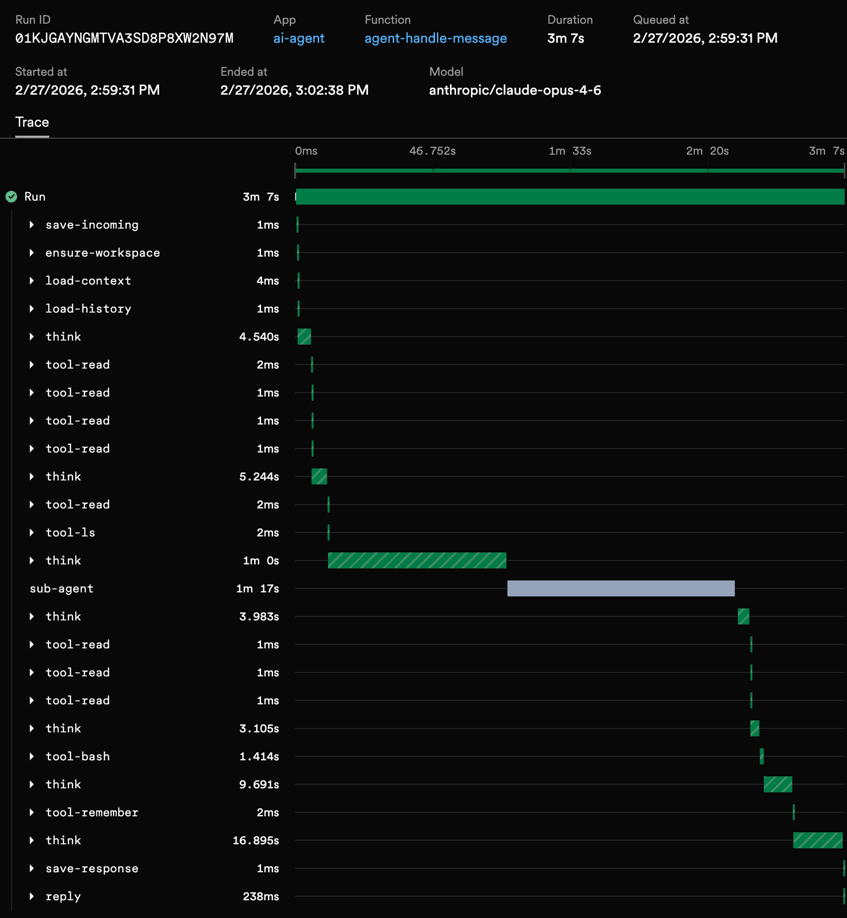
Silent failures are an observability problem as much as a reliability one. LLM-only logs tell you a model responded. They rarely show which tool ran, what it returned, or which iteration went sideways. Agent observability needs step-level visibility: every think and every tool call as its own span, with inputs, outputs, timing, and errors.
This is one of the things that surprised me most. When you run an agent loop with Inngest steps, you get detailed traces in the dashboard with no extra instrumentation — the same step-level model that powers durable execution is also your agent observability platform.
Each function run shows:
- Every step in sequence —
load-context→load-history→think→tool-bash→tool-read→think→tool-edit→think(final response) - Input and output for each step — what the LLM returned, what each tool produced, including errors
- Timing — how long each LLM call took, how long each tool ran
- Token usage and costs — logged per iteration via the step output
When something goes wrong — the agent loops too many times, a tool returns an error, the LLM hallucinates a bad tool call — you open the trace and see exactly what happened at each step. No console.log archaeology. No custom telemetry pipeline. That's how you catch agents that would otherwise fail silently.
For a broader look at traces, metrics, and debugging across LLM workflows and background jobs, see our LLM & Background Job Observability hub.
You can also leverage our extended traces middleware, which uses OpenTelemetry to automatically capture additional trace spans from within your steps. If your app doesn't already configure OpenTelemetry, preload @inngest/otel (for example node --import @inngest/otel/node), then add the middleware:
import { Inngest } from "inngest";import { extendedTracesMiddleware } from "inngest/experimental";export const inngest = new Inngest({id: "ai-agent",middleware: [extendedTracesMiddleware()],});
That's it. Every step's arguments and return values show up in the Inngest dashboard. For an agent that might run 15+ steps per conversation turn, this is the difference between debugging blind and having complete AI agent observability — one of the few agent observability tools that comes from the execution model itself, not a bolted-on logger.
Sub-Agents: Delegating Work
A single agent loop gets you surprisingly far. But some tasks are better run in isolation: long-running research, background file processing, scheduled reminders. That's where sub-agents come in.
With Inngest, a sub-agent is just another Inngest function with its own agent loop. The parent agent uses step.invoke to call the child agent.
The idea is simple: the parent agent has tools that spawn new agent loops. The benefit is that each sub-agent can start with its own session and context and its own set of tools.
Synchronous Delegation with step.invoke()
The parent agent calls a tool, blocks until the sub-agent finishes, and gets the result back. Use this when the parent needs the result to continue.
if (tc.name === "delegate_task") {const subSessionKey = `sub-${sessionKey}-${Date.now()}`;const subResult = await step.invoke("sub-agent", {function: subAgent,data: {task: tc.arguments.task as string,// Tip: you can pass useful context from the parent session// like a conversation ID in Slack or other data.subSessionKey,parentSessionKey: sessionKey,},});toolResult = {result: subResult?.response || "(Sub-agent returned no response)",};}
step.invoke() calls the sub-agent function directly and waits for it to complete. The parent's function run is paused (no polling needed! It's actually paused at the infrastructure level), so you're not burning compute while waiting. The sub-agent's result comes back as the tool result, and the parent continues its loop. This approach can even work on serverless.
The sub-agent itself reuses createAgentLoop — it's the same loop, same step-based execution, same durability. The only differences are the tools available (no delegation tools, to prevent recursive spawning) and the session key.
Beyond synchronous delegation, Inngest's event system unlocks two more powerful patterns: asynchronous sub-agents (fire-and-forget via step.sendEvent()) and scheduled sub-agents (future execution via step.sendEvent() with a ts timestamp). These let agents spawn work that outlives the parent conversation — research tasks, reminders, background processing. Learn all about these three key patterns in this blog post.
Putting It All Together
Here's the full picture in a few steps:
- An event arrives (from a webhook, API call, or another function) containing the user's message and a session key. This triggers
handleMessage. handleMessagepicks up the event, runs the agent loop with durable steps — each LLM call and tool execution is tracked and retryable.- The agent loop thinks, acts, observes — delegating to sub-agents when needed via
step.invoke()orstep.sendEvent(). - The agent replies with the result.
You don't need an agent framework for this — it's durable functions, events, and steps. This model is extremely flexible for iterating on context engineering, cost controls, or end-user experience. Inngest provides the underlying orchestration that makes durable AI agents reliable and observable.
Start Building
Dive into our docs or check out this reference repo which builds on these patterns. For step-level traces across agents and jobs, start from the observability hub.
All of these same patterns work for support bots, coding agents, research agents, automations. You can use them in any place where an LLM needs to take actions reliably — without failing silently.
Key Inngest primitives used:
| Pattern | Inngest Primitive | Use Case |
|---|---|---|
| Durable steps | step.run() | Each LLM call and tool execution |
| Sync sub-agent | step.invoke() | Blocking delegation |
| Async sub-agent | step.sendEvent() | Covered in next post |
| Scheduled sub-agent | step.sendEvent() + ts | Covered in next post |
| Singleton | singleton config | One run per session |
| Observability | extendedTracesMiddleware | Step-level visibility / agent observability |
| Reply events | step.run() | Handle the result |
Check out the Inngest docs for more on steps, invoke, and event-driven functions. To add approval gates to your agent, see the human-in-the-loop pattern.